

Key takeaways
- Compare five split and curved ergonomic keyboards with cushioned wrist rests for comfortable typing through long workdays at a home office desk.
A standard flat keyboard can leave your wrists bent outward and your shoulders hunched for hours at a time. An ergonomic keyboard changes the shape of the typing surface itself, using a split layout, a curved keyframe, or a built-in wrist rest to support a more neutral hand position. This guide compares five ergonomic keyboards for a home office, from a fully split wired model to compact wireless designs with cushioned palm rests. Each pick is described from its published specifications, so you can match the layout, connection type, and size to your desk before you buy. This guide is general information, not medical advice.
As an Amazon Associate, we earn from qualifying purchases.
Quick Answer
For most home offices, the Logitech Ergo K860 is the strongest all-round pick, with a split curved layout, a cushioned wrist rest, and Bluetooth plus USB receiver connectivity. If you want full separation between the two halves, the Kinesis Freestyle2 with VIP3 Lifters is the most adjustable option. Budget shoppers should start with the Kensington Pro Fit Ergo.
1. Logitech Ergo K860 Wireless Split Keyboard — Premium

The Logitech Ergo K860 is the best-known split ergonomic keyboard on the market, and its design covers the three features that matter most: a split keyframe, a curved typing surface, and a cushioned wrist rest. The two halves of the keyboard angle outward, so your hands rest in a straighter line with your forearms instead of bending inward toward the middle of the board. The curved profile raises the center of the keyboard, which supports a more relaxed wrist angle while you type.
The integrated wrist rest is covered in a stain-resistant fabric and runs the full width of the keyboard, so your palms stay supported without a separate accessory. Connectivity covers both Bluetooth and a USB receiver, and the keyboard pairs with Windows and Mac systems. It runs on two AAA batteries, which keeps the board free of a charging cable. The full-size layout includes a number pad, arrow keys, and function keys, so nothing about your workflow has to change when you switch from a standard board.
Specs
- Layout: Split curved keyframe with full-size number pad
- Wrist support: Integrated cushioned wrist rest
- Connectivity: Bluetooth and USB receiver
- Compatibility: Windows and Mac
- Power: Two AAA batteries
2. Microsoft Sculpt Ergonomic Keyboard for Business — Mid-range

The Microsoft Sculpt Ergonomic Keyboard takes a domed approach to comfortable typing. Its split layout separates the keys into two angled groups, and the domed shape lifts the middle of the board to reduce wrist rotation. A cushioned palm rest sits below the keys, and a removable riser under the front edge lets you set a negative tilt, angling the keyboard slightly away from you.
One useful detail is the separate number pad, which ships as its own unit. You can place it on either side of the keyboard, or leave it off the desk entirely when you want more room for your mouse. The keyboard connects over a 2.4 GHz wireless link and runs on two AAA batteries. It carries 107 keys in a QWERTY layout, including dedicated function keys and media controls, and its dimensions of 15.4 x 8.96 x 2.32 inches make it a full-size board that needs a standard-depth desk.
Note that Microsoft discontinued the Sculpt desktop line, and the keyboard is now made and sold by Incase under the Designed by Microsoft program, so check the listing to confirm the exact seller and model before ordering.
Specs
- Layout: Split domed keyframe with separate number pad
- Wrist support: Cushioned palm rest with removable riser for negative tilt
- Connectivity: 2.4 GHz wireless
- Keys: 107 keys, QWERTY layout
- Dimensions: 15.4 x 8.96 x 2.32 inches
3. Kinesis Freestyle2 Keyboard with VIP3 Lifters — Premium
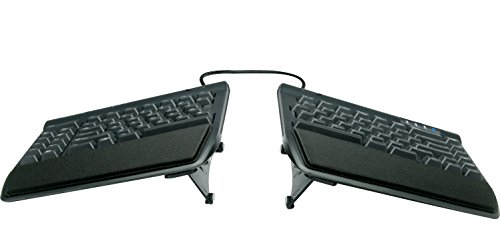
The Kinesis Freestyle2 is the only keyboard in this roundup that splits into two completely separate halves. The left and right sides connect by a cable, and you can spread them up to nine inches apart, matching the width of your shoulders instead of forcing your hands together. The included VIP3 lifters add adjustable tenting, letting you raise the inner edges of each half so your thumbs sit higher than your pinkies.
This is a wired USB keyboard for PC, with no battery to charge and no wireless pairing to manage. That simplicity makes it a reliable choice for a fixed desk setup, and the low-profile keys suit long typing sessions. Because the halves are independent, you can also place a document, a notebook, or a trackball between them, which is hard to do with a one-piece board.
The trade-off is the learning curve. A fully split layout feels unfamiliar for the first few days, and the tenting angles take some trial and error to set. Give yourself a week of regular use before judging the fit.
Specs
- Layout: Fully split two-piece design with up to 9 inches of separation
- Tenting: VIP3 lifters for adjustable tent angles
- Connectivity: Wired USB for PC
- Keys: Low-profile keys with standard QWERTY layout
- Power: USB powered, no batteries
4. Logitech Wave Keys Wireless Ergonomic Keyboard — Mid-range

The Logitech Wave Keys is a gentler introduction to ergonomic keyboards. Instead of a full split, it uses a wave-shaped key layout that angles the keys slightly, with a cushioned palm rest below. The shape nudges your hands into a more natural position without changing the feel of typing as much as a split board does, so most people adapt to it within a day or two.
Connectivity is flexible: the keyboard pairs over Bluetooth or through a Logi Bolt USB receiver, and Easy-Switch lets you move between paired devices with a keypress. It works with Windows and Mac systems, and the compact frame leaves more desk space than a full-size split board. The graphite finish is understated, and the board also comes in off-white and rose color options on the same listing family.
Specs
- Layout: Wave-shaped keyframe with cushioned palm rest
- Connectivity: Bluetooth and Logi Bolt USB receiver
- Device switching: Easy-Switch across paired devices
- Compatibility: Windows and Mac
- Color options: Graphite, off-white, and rose
5. Kensington Pro Fit Ergo Wireless Keyboard — Budget

The Kensington Pro Fit Ergo is the most affordable way into a true split layout. Its split and sloped keyframe angles the two halves apart, and a reverse tilt setting lets you slope the keyboard away from you, which some typists find easier on the wrists than a standard forward slope. The board is spill-resistant, a practical detail for a keyboard that sits beside a morning coffee.
It connects over Bluetooth, and the wireless design keeps the desk free of cables. The keys are quiet, which suits a shared home office or a desk in a living room where someone else is working or relaxing nearby. The board is wide, as split keyboards tend to be, so check that your desk has room for it alongside a mouse.
Specs
- Layout: Split and sloped keyframe with reverse tilt
- Connectivity: Bluetooth wireless
- Key feel: Quiet keys for shared spaces
- Protection: Spill-resistant design
- Model: Pro Fit Ergo wireless keyboard
How to Choose
Start with the layout. A fully split keyboard such as the Kinesis Freestyle2 gives you the most control over hand spacing and tenting, while a fixed split board such as the Logitech Ergo K860 or the Microsoft Sculpt is easier to learn. A wave layout such as the Logitech Wave Keys is the mildest change from a standard keyboard and the easiest to adapt to.
Next, check the connection. Bluetooth and USB receiver models let you switch between a laptop and a desktop, while a wired board such as the Freestyle2 never needs charging or pairing. If you type on a Mac as well as a Windows machine, confirm the listing names both systems.
Measure your desk before ordering. Split keyboards are wider than standard boards, and a cushioned wrist rest adds depth. Leave room for your mouse on the side you use it, and consider a monitor stand so the screen sits at eye level while your hands rest on the keyboard. If you enter figures often, choose a full-size board or a model with a separate number pad. Finally, think about tilt. Negative tilt and tenting options help you fine-tune the angle, but they only help if you take a few minutes to adjust them during your first week.
Who Should Skip
An ergonomic keyboard is not the right buy for everyone. If you type mostly on a laptop away from a desk, a full-size split board is too wide to carry and too awkward to balance on your lap. A compact wave board or a laptop stand is a better fit for mobile work.
Gamers should also look elsewhere. Ergonomic keyboards use membrane or low-profile keys tuned for typing comfort, not the fast actuation and anti-ghosting features of a gaming board. Heavy number-pad users on a tight desk may find a tenkeyless split board cramped, and anyone with very limited desk depth should measure carefully, since the wrist rest on a split board adds several inches front to back.
Frequently Asked Questions
Do ergonomic keyboards really feel different from a standard keyboard?
Yes. A split or curved layout changes the angle of your hands and wrists from the first keystroke, and most people notice the difference within minutes. Full adaptation usually takes a few days of regular typing.
How long does it take to get used to a split keyboard?
Most typists adjust within three to seven days. Typing speed may dip at first, especially on a fully split board, then returns to normal as the new hand position becomes familiar.
Can I use an ergonomic keyboard with a laptop?
Yes. Wireless models pair over Bluetooth or a USB receiver, and wired models connect through a USB port. A laptop stand that raises the screen to eye level pairs well with an external ergonomic keyboard.
Is a wrist rest the same as an ergonomic keyboard?
No. A wrist rest supports your palms, but only a split or curved keyframe changes the angle of the keys themselves. The keyboards in this roundup combine both features, which is why they feel different from a standard board with an add-on rest.
Final Verdict
The Logitech Ergo K860 is the best overall pick for a home office, combining a split curved layout, a cushioned wrist rest, and flexible wireless connectivity. The Kinesis Freestyle2 with VIP3 Lifters is the choice for maximum adjustability, with fully separate halves and tenting. The Microsoft Sculpt suits typists who want a domed board and a detachable number pad, the Logitech Wave Keys is the easiest first step into ergonomic typing, and the Kensington Pro Fit Ergo proves that a true split layout does not need a premium budget. Whichever you choose, give it a full week of daily use before deciding.
Product and ASIN Reference
| Product | ASIN |
|---|---|
| Logitech Ergo K860 Wireless Split Keyboard | B07ZWK2TQT |
| Microsoft Sculpt Ergonomic Keyboard for Business | B00CYX26BC |
| Kinesis Freestyle2 Keyboard with VIP3 Lifters | B0089ZLENA |
| Logitech Wave Keys Wireless Ergonomic Keyboard | B0BTNY72VD |
| Kensington Pro Fit Ergo Wireless Keyboard | B07X7GL76R |
More from Amazon
Programs that pair well with the guide above. Offers and eligibility are set by Amazon and may change.
Collect the home and kitchen items you want in one registry that guests can shop from.
Create a wedding registrySet up recurring deliveries of everyday items on eligible products. Terms and savings are set by Amazon.
Explore Subscribe & SaveFree shipping on eligible items, Prime Video and more. Eligible new members can start with a free trial.
Start a Prime free trialAudiobooks and podcasts to listen to on the go. Eligible new members can start with a free trial.
Try Audible freeAs an Amazon Associate we earn from qualifying purchases.

Write Your Review
No reviews yet. Be the first to share your experience!