

Key takeaways
- Compare the best big button remotes on button size, backlighting, learning functions and device compatibility to make TV control simple for aging hands.
As an Amazon Associate we earn from qualifying purchases.
The real decision here is not which remote has the most functions, but which one removes the functions that cause trouble. A standard remote buries power, volume and channel keys among dozens of small buttons, and one wrong press can strand a viewer on a blank input screen. A good big button model keeps the everyday keys large, clearly labeled and hard to confuse, while matching how the household actually watches: cable box, antenna or a TV used on its own.

This guide is for older adults with low vision, arthritis or unsteady hands, for people with memory difficulties who need the simplest possible layout, and for family members setting up a remote for someone else. Every pick below was chosen from the product names and specifications published on its Amazon product page, with attention to button size, backlighting, setup method and which devices each remote can genuinely control.
Quick Picks
Disclosure: This article contains affiliate links. If you buy through these links, we may earn a commission at no extra cost to you.
| Product | Best for | Key spec from title |
|---|---|---|
| Flipper Big Button Universal TV Remote | One remote for a TV and cable box, with favorite channels | Learning function, supports IR devices |
| UltraPro BigEZ OneTouch Big Button Universal TV Remote | Dark living rooms where buttons must glow to be found | Backlit buttons, 2 device control |
| GE Big Button Universal Remote Control 33701 | Viewers who still want a full number pad in large type | 2-device control, silver finish |
| Continu.us EasyMote Universal Big Button TV Remote DT-R08W | The fewest possible buttons, taught exactly what to do | Backlit, learning television and cable box controller |
| EZclicker Plus Big Button Universal TV Remote | A TV-only household that still uses menus and a guide | Universal remote for major TV brands |
How to Choose
Count the devices the remote must actually run
Start by listing what gets switched on for a normal evening of viewing. Many homes need only the television itself, because channels arrive through an antenna or the TV’s own tuner. Others add a cable or satellite box, and some add a soundbar for clearer dialogue. Each extra device rules out the simplest TV-only remotes. A two-device model can usually power the TV and box together and split duties sensibly, sending volume commands to the TV and channel commands to the box. Buy for the setup in the room today, not for equipment that might arrive later, because every added device button is one more thing to press by accident.
Decide between pre-programmed codes and learning
Pre-programmed remotes carry a library of brand codes inside them. Setup means finding your TV brand in the list, entering a code, and testing the power button. That route is predictable and works even if the original remote is lost. Learning remotes take the opposite approach: they copy signals directly from the remote you already own, button by button. Learning is the better answer for an unusual brand, an older box with an odd code set, or a single function no code seems to cover. Its weakness is practical. The original remote must still work, and someone patient has to teach each key. Households with a helper available for one setup session can use either method confidently.
Match button size, contrast and backlighting to the viewer
Oversized buttons help only when the labels on them can be read at arm’s length, in the light the room actually has. Look for large printed characters rather than small icons, strong contrast between the button and its lettering, and shapes that fingers can tell apart by touch. Color coding helps some viewers, especially when volume and channel keys carry different colors. Backlighting matters most for evening viewing in a dim room, where unlit gray lettering disappears. A fully backlit keypad is easier to use than one glowing button, but remember that lights draw power each time they wake, so a household slow to change batteries may prefer bold print instead.
Be honest about streaming sticks and smart features
Almost every remote in this category speaks infrared, the same line-of-sight signal older televisions use. That works well for TVs, cable boxes, satellite receivers and many soundbars. It does not work for streaming sticks that communicate by radio signals or Wi-Fi, and several listings say so plainly. If the household watches through a stick plugged into the back of the TV, a big button infrared remote will not control that stick, no matter how universal the packaging sounds. In that case, plan on keeping the stick’s own remote nearby, choosing a television with the apps built in, or picking a universal model whose listing names your exact streaming box as supported.
The 5 Best Options
Flipper Big Button Universal TV Remote
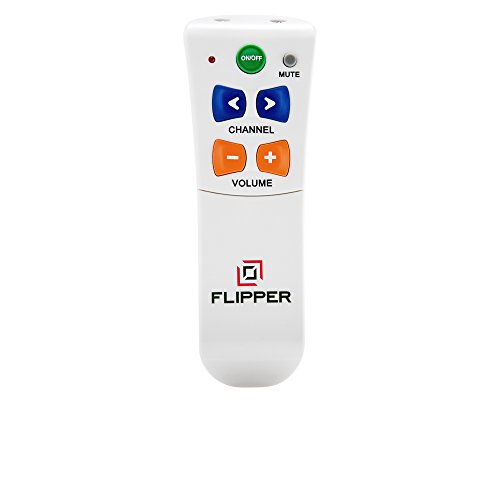
Flipper takes the boldest approach in this group: the face of the remote shows only the everyday controls, with large color-coded keys for power, volume, channel and mute. A sliding panel hides the number pad and programming keys underneath, so the buttons that can cause confusion stay out of sight during normal viewing. It runs a television and a cable or satellite box together, and its favorite-channel feature lets a helper limit channel surfing to a short list of familiar stations. For a viewer with memory difficulties, that combination of few visible choices and locked-in favorites is difficult to beat.
Specs
- Model number A22, made by Flipper LLC
- Controls up to 2 devices: a television and a set top box
- Infrared connectivity with a maximum range of 10 meters
- Runs on 2 AAA batteries
- Learning function and favorite channels, per the listing title
Best for: A parent or spouse who watches cable or satellite TV and gets lost among the buttons on a standard remote.
Watch out for: It cannot control streaming sticks, and the hidden keypad means a helper should handle the one-time setup and favorite-channel programming.
ASIN: B002GR1YZ0
UltraPro BigEZ OneTouch Big Button Universal TV Remote
The BigEZ OneTouch is built around preset convenience. Dedicated brand buttons cover Samsung, LG, Vizio, Sony and Roku televisions, so setup for those sets can be as simple as inserting batteries and holding the matching brand button. The white body is extra large and hard to misplace between cushions, and every button is backlit, which makes it the strongest choice here for a dim room. Volume keys are blue and channel keys are orange, a pairing chosen so the two most-used controls stay distinguishable for colorblind viewers. An auxiliary button adds a second device, preset for Roku boxes but programmable for other equipment.
Specs
- Model number 85053, made by Jasco Products Company, LLC
- Controls up to 2 devices: a TV plus one auxiliary device
- Fully backlit, oversized buttons on a white body
- Runs on 2 AA batteries
- Package dimensions 8.74 x 2.52 x 1.34 inches; item weight 3.68 ounces
Best for: Evening viewers with low vision who own one of the five preset TV brands and want setup finished in minutes.
Watch out for: The listing states plainly that it is not compatible with Roku Streaming Stick, Amazon Fire TV Stick, Chromecast with Google TV or Apple TV 4K, because those devices do not use infrared.
ASIN: B0F6SVQLBQ
GE Big Button Universal Remote Control 33701

This GE model keeps the familiar shape of a traditional remote and makes everything on it bigger. Instead of stripping the keypad down, it offers large, easy-to-read buttons including a full number pad, previous channel and a dot key for digital sub-channels such as 4.1. That fuller layout suits viewers who still type channel numbers and would feel shortchanged by a six-button design. It controls two devices, comes preprogrammed for Samsung televisions, and offers both direct code entry and an automatic code search for other brands. A master volume feature lets the volume keys keep running the TV or soundbar even when the cable box is the selected device.
Specs
- Model number 33701, made by Jasco Products Company, LLC
- Controls up to 2 devices, including TVs, cable and satellite boxes, disc players and sound bars
- Infrared connectivity with a maximum range of 30 feet
- Runs on 2 AA batteries, not included
- Silver finish; preprogrammed for Samsung TVs
Best for: A viewer with low vision who still wants direct channel entry and a conventional layout, just in much larger print.
Watch out for: There are no menu navigation arrows, so it handles everyday viewing well but cannot walk through a smart TV’s on-screen menus; confirm your second device appears in the code list before ordering.
ASIN: B0742HVB24
Continu.us EasyMote Universal Big Button TV Remote DT-R08W

EasyMote reduces the remote to six large, bright, backlit buttons. Power, mute, volume up and down, and channel up and down are the whole interface, which is the point for someone who finds a crowded keypad overwhelming. It can run both a television and a cable box, and it offers two ways to get there: a Quick Search that steps through common TV codes, and a learning mode that copies commands from the original remote. That learning mode is valuable when a code search fails on an older set. A wrist strap rounds out the design, making the remote harder to drop behind furniture or carry into another room.
Specs
- Model DT-R08W, brand Continu.us
- Six large backlit buttons for basic TV control
- Controls a television and a cable box over infrared
- Dimensions 5 x 2.25 x 0.9 inches; weight 2.24 ounces
- Runs on 2 AA batteries, not included; wrist strap included
Best for: A viewer with dementia, very low vision or weak grip who needs the simplest possible face, in a room where a cable box is also in use.
Watch out for: Six buttons cannot open menus, type channel numbers or browse apps, and learning mode requires the original remote to be working and pointed at the EasyMote during setup.
ASIN: B01M1UV2T2
EZclicker Plus Big Button Universal TV Remote
EZclicker Plus sits between the stripped-down models and a full universal remote. Its thirteen buttons include a navigation cluster with an extra-large enter key, plus menu and return buttons, so the viewer can move around a smart TV’s home screen and guides instead of only changing channels. Programming uses a single search routine: hold mute and volume up together, and release when the TV responds. The trade-off for that menu access is scope. This is a television-only remote, with no control over a separate cable box or disc player, so it fits a household where everything watched comes through the TV itself, whether by antenna or built-in apps.
Specs
- Model number EZCPTVB, brand EZClicker
- Controls 1 device: the television only
- 13 buttons, including navigation arrows and an extra-large enter button
- Infrared connectivity with a maximum range of 45 feet
- Runs on 2 AAA batteries, not included
Best for: An antenna or smart TV household where the viewer still opens menus and guides, but needs every button bigger and easier to press.
Watch out for: The listing is explicit that it does not work with cable boxes, Fire Stick, Roku Stick or disc players, so check the compatibility list for your exact TV brand first.
ASIN: B0DQ65PFND
Which One Fits Your Situation
A parent with memory loss who only watches cable news and a few favorite shows
Choose the Flipper. Its visible face offers almost nothing to get wrong, the sliding cover keeps programming keys hidden, and a family member can load a short list of favorite channels so the channel buttons cycle only through familiar stations. Set it up once, lock the programming, and everyday use becomes a matter of power, volume and one channel key.
Evening viewing in a dark room with weakening eyesight
Choose the UltraPro BigEZ OneTouch if the television is a Samsung, LG, Vizio, Sony or Roku TV. Every button lights up, the white body stands out against a dark sofa, and the blue and orange volume and channel keys stay easy to tell apart. If the TV is a different brand, the EasyMote’s six backlit buttons are the fallback, accepting a simpler layout in exchange for the glow.
One television, an antenna, and no cable box at all
Choose the EZclicker Plus. With no second device to run, its TV-only design is not a limitation, and its navigation pad and menu button still let the viewer browse the program guide and settings. Its longer infrared range also suits a larger living room where the chair sits well back from the screen.
A soundbar joined the setup and dialogue is still hard to follow
Choose the GE 33701. It can run the television and a second device, and its master volume feature keeps the volume keys pointed at the TV or soundbar regardless of which device is selected for channels. That removes the most common two-remote confusion, where the picture changes but the sound seems stuck.
Common Mistakes
- Assuming “universal” includes streaming sticks. Most big button remotes use infrared only, and sticks that rely on radio signals or Wi-Fi will not respond. Read the compatibility notes on the listing, not just the headline.
- Buying a TV-only remote for a home where a cable box does the channel changing. The TV will turn on, but channels will not move. Count the devices first, then choose the remote.
- Skipping the setup session. Code entry, code search and learning all go better with fresh batteries, the original remote nearby and ten quiet minutes. A half-finished setup is the main reason these remotes get returned.
- Choosing the model with the most buttons for someone with memory difficulties. Extra keys for menus, inputs and apps create wrong turns. For that viewer, fewer visible buttons is the feature.
- Forgetting line of sight. Infrared needs a clear path to the TV or box. A cable box shut inside a cabinet, or a sensor blocked by a soundbar, will make even the right remote seem broken.
Frequently Asked Questions
Will a big button remote work with a streaming stick?
Usually not. The remotes in this guide communicate by infrared, which needs a direct line of sight to the device. Most streaming sticks use radio-frequency or Wi-Fi signals instead, and several listings name the sticks they cannot control. A big button remote can still run the television itself, but the stick’s own remote stays in charge of streaming.
What is the difference between a learning remote and a pre-programmed one?
A pre-programmed remote stores a library of brand codes, and you activate the right one for your television or box during setup. A learning remote copies signals directly from your existing remote, one button at a time. Learning handles unusual or older equipment that codes miss, but it only works while the original remote still functions.
Can one of these remotes control both a TV and a cable box?
Yes, if you pick a two-device model. The Flipper, UltraPro BigEZ, GE 33701 and EasyMote in this guide each run a television plus a second device, typically powering both together while sending channel commands to the box and volume commands to the TV. TV-only models such as the EZclicker Plus cannot do this, so check the device count before buying.
What should I do if the remote stops responding after working well?
Start with fresh batteries, since backlit models in particular fade gradually rather than failing all at once. Next, check that nothing blocks the sensor on the TV or cable box, and confirm the remote is set to the right device if it has device buttons. If it still fails, repeat the original code entry or learning steps from the manual.
More from Amazon
Programs that pair well with the guide above. Offers and eligibility are set by Amazon and may change.
Collect the home and kitchen items you want in one registry that guests can shop from.
Create a wedding registrySet up recurring deliveries of everyday items on eligible products. Terms and savings are set by Amazon.
Explore Subscribe & SaveFree shipping on eligible items, Prime Video and more. Eligible new members can start with a free trial.
Start a Prime free trialAudiobooks and podcasts to listen to on the go. Eligible new members can start with a free trial.
Try Audible freeAs an Amazon Associate we earn from qualifying purchases.





Write Your Review
No reviews yet. Be the first to share your experience!