
Our Short List of 3

- Print technology: Thermal dye-sublimation with laminated protective finish
- Maximum print size: 4 x 6 inches
- Resolution: 300 dpi class dye-sublimation output
- Connectivity: Built-in Wi-Fi hotspot, Liene app for iPhone and Android

- Print technology: ZINK zero-ink thermal printing on specialty paper
- Print size: 2 x 3 inches, sticky-back paper
- Resolution: 313 x 400 dpi
- Connectivity: Bluetooth and NFC, Kodak Step app for iPhone and Android

- Print technology: Instax Wide instant film, chemically developed prints
- Print size: Wide film, image area about 3.9 x 2.4 inches
- Resolution: 318 dpi print density
- Connectivity: Bluetooth, Instax Link Wide app for iPhone and Android
All 4 Picks at a Glance
| Product | Specs | Action |
|---|---|---|
| 2. Liene 4 x 6 Photo Printer (M100, DHP513) — Wi-Fi Dye-Sublimation With Generous Bundles |
| Check price on Amazon |
| 3. Kodak Step Instant Photo Printer — Pocket ZINK Prints With NFC Pairing |
| Check price on Amazon |
| 4. Fujifilm Instax Link Wide — Bigger Instant Prints From Your Phone |
| Check price on Amazon |
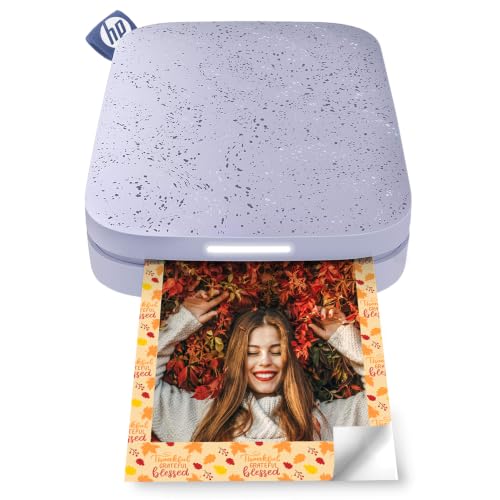 5. HP Sprocket Portable 2 x 3 — Sticky-Back ZINK Prints Anywhere |
| Check price on Amazon |
Key takeaways
- Compare the best photo printers on print quality, paper size, connectivity and print technology to make sharp, lasting photos at home or on the go.
As an Amazon Associate we earn from qualifying purchases.
Disclosure: This article contains affiliate links. If you buy through these links, we may earn a commission at no extra cost to you.
Phone cameras hold years of family life and travel, yet most of those images never leave a screen. A dedicated photo printer changes that. Unlike a general office machine that happens to handle pictures, the best photo printers are built for one job: turning digital files into physical prints with accurate color, smooth gradients, and a finish made to last. This guide covers only dedicated photo models — dye-sublimation, instant film, and inkless portable printers.
Some readers want a framed 4 x 6 print that looks like it came from a lab. Others want a small print in hand within a minute at a party or in a journal. The five printers below cover that full range, from Wi-Fi dye-sublimation models for the home desk to pocket printers that run from a phone app.
How to Choose a Photo Printer
Print technology matters most. Dye-sublimation printers heat a ribbon and transfer color in layers, then add a clear protective coating. The result is smooth tone and prints that resist water, fingerprints, and fading far better than a plain ink print. Instant film printers expose real photographic film, so the image develops chemically, much like a classic instant camera, with soft color and a white border built in. ZINK printers use paper with color crystals embedded in the sheet, activated by heat, so there is no ink, ribbon, or film pack to load, and many sheets carry a peel-off sticky back.
Print size comes next. A 4 x 6 inch print suits frames, albums, and greeting cards. Credit-card sized prints suit wallets, journals, and scrapbooks. Wide instant prints sit between the two, giving group shots more room.
Connectivity shapes daily use. Wi-Fi models join a home network and accept prints from several phones and computers, and some also read memory cards or USB drives directly. Bluetooth-only models pair with one phone at a time, simpler on the move. App quality matters too, because every portable printer here relies on its app for cropping, borders, and collages.
Finally, think about supplies and placement. Dye-sublimation printers use matched ribbon and paper packs. Film printers use packs of ten sheets. ZINK printers need only paper. A desk can hold a larger 4 x 6 model, while a bag favors a flat mini printer.
1. Canon SELPHY CP1500 — Best 4 x 6 Dye-Sublimation Prints at Home
The Canon SELPHY CP1500 is the classic home photo printer in this group, and it earns that place with print quality. Its dye-sublimation engine lays down color in passes and finishes each print with a protective overcoat, producing smooth skin tones, deep blacks, and a lab-style gloss. Canon rates the finished prints for long album life when stored away from light, and the coating shrugs off splashes and handling.
It prints up to postcard size, and Canon also offers smaller card and label media for crafts and labeling. A tilting color screen lets you preview and print from a memory card or USB drive without a phone at all, a rare and welcome touch. Wi-Fi covers phones and computers around the house, and the SELPHY Photo Layout app adds collages and patterned borders.
The body is compact, though it needs clear space front and back because paper travels through the machine several times during a print. An optional battery pack makes it portable for events, but at home it works best as a small print station. If your main goal is a proper 4 x 6 photograph, this is the benchmark here.
Specs
- Print technology: Dye-sublimation with protective overcoat layer
- Maximum print size: 4 x 6 inches (postcard), plus card and label media options
- Resolution: 300 x 300 dpi
- Connectivity: Wi-Fi, AirPrint, USB, SD memory card slot, SELPHY Photo Layout app
- Display: 3.5-inch tilting color LCD for direct preview and printing
- Power: AC adapter included, optional rechargeable battery pack available
2. Liene 4 x 6 Photo Printer (M100, DHP513) — Wi-Fi Dye-Sublimation With Generous Bundles
- Print technology: Thermal dye-sublimation with laminated protective finish
- Maximum print size: 4 x 6 inches
- Resolution: 300 dpi class dye-sublimation output
- Connectivity: Built-in Wi-Fi hotspot, Liene app for iPhone and Android
The Liene 4 x 6 Photo Printer, sold as the M100 with model number DHP513, takes the same dye-sublimation approach as the Canon and aims it at phone users. It builds its own Wi-Fi hotspot, so your phone connects directly without depending on a home router — handy in apartments, dorms, and event spaces where network access is limited or shared. The Liene app handles layout, filters, and print duties.
Prints emerge in four passes, one for each color layer and one for the clear laminate finish. The finished sheet is glossy and water resistant, with color that stays smooth in skies and faces where lesser printers show banding. Because ribbon and paper come in matched packs, a fresh pack renews both at once.
This bundle ships with a large supply of paper and cartridges, a practical pick for an album project, a wall display, or a run of greeting cards. The printer is a low, flat slab that slides onto a shelf easily, though it needs room behind it while a sheet cycles through. For phone-first households that want full-size prints without a router in the middle, it is a strong, simple option.
3. Kodak Step Instant Photo Printer — Pocket ZINK Prints With NFC Pairing
- Print technology: ZINK zero-ink thermal printing on specialty paper
- Print size: 2 x 3 inches, sticky-back paper
- Resolution: 313 x 400 dpi
- Connectivity: Bluetooth and NFC, Kodak Step app for iPhone and Android
The Kodak Step prints phone photos onto 2 x 3 inch ZINK paper, which holds its color inside the sheet, so there is no ink, ribbon, or film pack to load. A finished print slides out in under a minute, and the peel-off sticky back turns it straight into a sticker for a journal, laptop, or bedroom wall. Color is bright and casual rather than lab-focused, which suits everyday snapshots, pet photos, and party pictures well.
The Kodak Step app connects over Bluetooth, and NFC gives compatible phones a quicker tap-to-pair route. The app adds far more than a print button: cropping, filters, borders, stickers, and collages, plus tools for pulling images from social accounts. That editing depth makes it easy to fix a shot before any paper is used.
The printer fits a jacket pocket or small bag, runs on a built-in rechargeable battery good for about twenty-five prints per charge, and charges over USB. An initial pack of ZINK paper comes in the box, so printing can begin right away. If you want a pocket printer that pairs fast and needs nothing but paper, this is a simple, tidy way to get it.
4. Fujifilm Instax Link Wide — Bigger Instant Prints From Your Phone
- Print technology: Instax Wide instant film, chemically developed prints
- Print size: Wide film, image area about 3.9 x 2.4 inches
- Resolution: 318 dpi print density
- Connectivity: Bluetooth, Instax Link Wide app for iPhone and Android
The Fujifilm Instax Link Wide takes the instant film idea up to Instax Wide film, twice the width of the Mini format. Landscapes stop feeling cramped, group photos give everyone room, and detail stays legible. For weddings, team events, travel walls, and guest books, that extra width makes a visible difference, and the white border still leaves space for captions.
The Link Wide app offers a natural mode for faithful color and a rich mode for deeper, punchier prints. It can also print a QR code onto an image linking to a short video, a voice message, or a web page, a clever touch for event photos and gifts. Editing tools cover cropping, rotation, filters, and text, so most fixes happen before film is used.
Despite the larger film, the printer stays portable, with a flat body that travels in a tote or backpack and a rechargeable battery charged over USB. It pairs quickly over Bluetooth and can stand upright or lie flat while printing. Choose it when you like the instant format but find credit-card prints too small.
5. HP Sprocket Portable 2 x 3 — Sticky-Back ZINK Prints Anywhere
- Print technology: ZINK zero-ink thermal printing on specialty paper
- Print size: 2 x 3 inches, sticky-back paper
- Resolution: 313 dpi class ZINK output
- Connectivity: Bluetooth, HP Sprocket app for iOS and Android
The HP Sprocket takes a different route from both dye-sublimation and film. It uses ZINK paper, which holds its color inside the sheet and needs no ink, ribbon, or cartridge. Load a pack of 2 x 3 inch paper, send a photo from the HP Sprocket app over Bluetooth, and a finished print slides out in under a minute. Most Sprocket paper has a peel-off sticky back, so prints become stickers for journals, laptops, and walls the moment they appear.
Output is small and casual by design. Color is lively rather than lab-accurate, and fine detail softens at this size, which suits snapshots, pet photos, and everyday moments. The app leans into that spirit with borders, stickers, text, and collage tools, plus tiled printing that splits one image across several sheets.
The printer is barely larger than the paper it holds, weighs little, and charges over USB. With no liquid ink and no film chemistry, it is tidy to carry and simple to share with younger users. For the fastest path from phone photo to a keepsake you can stick anywhere, the Sprocket is built for exactly that.
Comparison Summary
For framed, album-quality 4 x 6 prints, the Canon CP1500 and the Liene lead this group. Both use dye-sublimation with a protective finish; the Canon adds a screen and card printing, while the Liene builds its own Wi-Fi hotspot. For instant film, the Link Wide gives groups and landscapes the room that smaller formats lack. For small, sticky-back prints with no ink or film to manage, the Kodak Step adds NFC pairing and the HP Sprocket adds tiled printing. Paper size decides most of this choice: 4 x 6 for display, Wide for impact, and 2 x 3 ZINK for journals and stickers.
Frequently Asked Questions
Which print technology lasts the longest?
Dye-sublimation prints with a protective overcoat, like those from the Canon SELPHY CP1500 and the Liene, hold up best in albums and frames because the color sits under a sealed layer. Instant film also keeps well when stored away from strong light. ZINK prints are made for casual display and journals, so treat them as fun keepsakes rather than archival pieces.
Can these printers work without a computer?
Yes. Every printer here works from a phone app, and none needs a computer for normal use. The Canon SELPHY CP1500 goes further, printing directly from an SD card or USB drive using its own screen. The Instax, Liene, Kodak, and HP models all pair with iPhone or Android phones through their free apps.
What is the difference between instant film prints and ZINK prints?
Instant film is real photographic film: the printer exposes it, and the image develops chemically over about ninety seconds, giving soft color and a built-in white border. ZINK paper holds color crystals in the sheet and forms the image with heat, finishing almost immediately, and most sheets are sticky-backed. Film favors a classic look and larger sizes; ZINK favors speed and sticker use.
How do I keep print quality high from a phone photo?
Begin with the original full-size image rather than a screenshot or a compressed copy from a messaging app. Check the crop in the app before printing, because small formats crop tightly, and brighten very dark photos slightly, since prints often look darker than a backlit screen. Store film and paper flat, dry, and away from heat, and let prints rest a few minutes before stacking or framing them.
Conclusion
The best photo printers turn a crowded camera roll back into objects you can frame, gift, and keep. Choose dye-sublimation, in the Canon CP1500 or the Liene, when lasting 4 x 6 quality is the goal. Choose the Instax Link Wide when the instant look is part of the fun, with its wide format earning its place for groups and scenery. Choose the Kodak Step or the HP Sprocket when small sticky prints and portability matter most.
More from Amazon
Programs that pair well with the guide above. Offers and eligibility are set by Amazon and may change.
Collect the home and kitchen items you want in one registry that guests can shop from.
Create a wedding registrySet up recurring deliveries of everyday items on eligible products. Terms and savings are set by Amazon.
Explore Subscribe & SaveFree shipping on eligible items, Prime Video and more. Eligible new members can start with a free trial.
Start a Prime free trialAudiobooks and podcasts to listen to on the go. Eligible new members can start with a free trial.
Try Audible freeAs an Amazon Associate we earn from qualifying purchases.
Write Your Review
No reviews yet. Be the first to share your experience!