

Key takeaways
- Compare the best talking clocks on voice clarity, volume, button size and alarm options so low-vision users can hear the time, date and reminders clearly.
As an Amazon Associate we earn from qualifying purchases.
A talking clock earns its place when a person can hear the time clearly on the first press, in a voice that carries across the room without shouting, from a button they can find by touch alone. Weak speakers, small crowded controls and menus that need sight to set up are what separate a helpful clock from a frustrating one, far more than screen size alone.
This guide is for blind and low-vision adults, seniors who no longer read small digits reliably, and family members setting up a clock for someone else. Every pick below was chosen from the names and specifications on its Amazon product page, with spoken time and date as the starting requirement, and with alarm and reminder options compared for daily routines at home.
Quick Picks
Disclosure: This article contains affiliate links. If you buy through these links, we may earn a commission at no extra cost to you.
| Product | Best for | Key spec from title |
|---|---|---|
| Cirbic Extra Large Talking Button Clock | The biggest, easiest button to find by touch | Extra-large blue button on a 4.5 x 2.5 inch base |
| ORKA Talking Clock | Reminders recorded in a familiar voice | Up to 8 voice-recordable alarms |
| Mitoart Digital Alarm Clock | Spoken time in several languages | Voice announcement in 9 languages |
| GOLOZA 7” Digital Dementia Clock | Fine control over announcement volume | Talking clock with 10 volume levels |
| Cirbic Talking Large Button Alarm Clock | A compact button clock for bedside or travel | Large talking button, powered by 2 AA batteries |
How to Choose
Voice Clarity and What Gets Announced
A clear voice matters more than a long feature list, because the announcement is the whole point of the clock. Listen for a natural speaking pace and full words rather than clipped fragments. Check what a single press actually delivers: some clocks announce only the time, while others follow with the day and date on a second press, which helps anyone who loses track of the calendar. Language options also belong here. A clock that speaks in the language the user thinks in will be understood faster, especially first thing in the morning or during the night.
Volume Range and Speaker Placement
Hearing the announcement from another room, or over a television, depends on both maximum volume and how finely it can be turned down at night. Wide adjustment ranges suit households where hearing varies through the day, while a simple high and low switch is easier for a user who dislikes menus. Speaker position plays a part too: a top or front-facing speaker projects toward the listener, whereas one underneath can sound muffled on soft bedding. If the clock will wake a heavy sleeper or prompt medication from the hallway, favour the models that publish a higher maximum output.
Button Size and Controls You Can Find by Touch
For a blind user, the talk button is the interface, so its size, contrast and placement decide whether the clock gets used daily. One oversized button on top, pressed once for time and again for date, removes nearly all learning. Display clocks take the opposite approach, spreading controls across a back panel or a remote, which works when a family member handles setup and the user only triggers announcements. Either way, spoken setup prompts are valuable: a clock that reads its own settings aloud can be adjusted by the user alone instead of waiting for a sighted helper.
Alarms, Reminders and Power Source
Decide early whether the clock only needs to speak the time or also carry the day’s routine. Recordable reminders let a relative’s voice prompt medication, meals or appointments, which many users respond to better than a beep. Count the alarms offered and whether they can repeat on weekdays only. Power matters just as much. Battery button clocks keep working anywhere and shrug off outages, while mains-powered display clocks need a backup battery to hold settings. Check what the listing says is included, because a backup cell is sometimes required rather than supplied.
The 5 Best Options
Cirbic Extra Large Talking Button Clock

With no screen to read at all, this Cirbic suits blind users and anyone whose remaining sight cannot manage digits, because one oversized blue button does everything. Pressing it announces the time, pressing again gives the date, and the same button handles the alarm. Setup uses spoken instructions, so the owner can set it without help. The two voice volume settings keep operation simple, and the high-contrast button is easy to locate by sight or touch on a nightstand.
Specs
- Brand: Cirbic
- Colour: Blue
- Dimensions: 4.5 inches wide x 2.5 inches high
- Item weight: 6.4 ounces
- Batteries: 3 AAA batteries required, included on the listing
- Voice: North American English male voice
- Volume settings: High and Low
- Model number: SC09
Best for: Users who want one huge button and no display to manage.
Watch out for: Confirm whether batteries are in the box before ordering spares, because the listing and manual wording differ on inclusion.
ASIN: B0716WFMW1
ORKA Talking Clock

ORKA built the Talking Madi around recorded reminders, so it fits households where a familiar voice prompts medication, meals and appointments better than any tone could. Up to eight alarms can carry personal voice messages, and a button press announces the time, day, month, date and year. The large display spells the day in full for anyone with partial sight, and announcements and display text are offered in six languages. It runs from the mains, with a battery keeping settings safe during an outage.
Specs
- Brand: ORKA
- Model number: PERVIN
- Display: Digital, extra-large digits 1.93 inches high
- Overall size: 9.63 x 5.69 x 2.68 inches
- Item weight: 2 pounds
- Material: ABS
- Alarms: Up to 8, with personalised voice recordings
- Languages: English (US and UK), Spanish, French, German and Italian
- Maximum volume: 90 decibels on the listing
Best for: Medication and routine reminders spoken in a family member’s own voice.
Watch out for: It is not battery operated for everyday use, so place it within reach of a mains socket.
ASIN: B07NP6JP5P
Mitoart Digital Alarm Clock

The Mitoart DC07 pairs a seven-inch display with a spoken announcement in nine languages, which makes it a strong fit for multilingual households and users who still read large, unabbreviated words. Pressing the OK button on the back of the clock or on the remote announces the current time aloud. The screen darkens in the evening and brightens in the morning on its automatic dimming schedule, and the clock can stand on a surface or hang on a wall. Multiple alarm slots cover medication and schedule reminders through the day.
Specs
- Brand: Mitoart
- Model number: DC07
- Colour: Black, 7-inch version
- Dimensions: 5.6 inches wide x 7.8 inches high
- Item weight: 15.5 ounces
- Power source: Corded electric, with 1 nonstandard battery included
- Special features: Voice announcement time, auto dimmable, LED display
- Languages: 9 language settings on the listing
- Mounting: Tabletop stand or rear wall-mounting hole
Best for: Users who want spoken time plus a large, full-word day and date display.
Watch out for: The voice button sits on the back of the clock or the remote, so keep the remote somewhere it can be found by touch.
ASIN: B0DYCNG8QK
GOLOZA 7” Digital Dementia Clock

GOLOZA’s seven-inch clock, model GE904, stands out for how precisely its voice can be set, with ten volume levels for announcements triggered by a button press or an hourly chime. That range helps in homes where a morning announcement needs to carry but an evening one should stay gentle. The display offers several colour modes, automatic dimming softens the screen at night, and dedicated pill reminders sit alongside ordinary alarms and birthday or holiday reminders. A remote control handles setup from a chair or bed.
Specs
- Brand: GOLOZA
- Model: GE904
- Screen size: 7 inches, LCD display
- Power source: Corded electric
- Material: ABS
- Item weight: 1.04 pounds
- Talking function: Announces the time on a button press or as an hourly chime
- Volume: Adjustable across levels L0 to L10 shown in the manual
- In the box: Power adapter, 1.5-metre USB cable and remote control
Best for: Households that need announcement volume tuned closely for day and night.
Watch out for: Check the selected colour mode and dimming schedule during setup, because a low-contrast mode can undo the display’s readability.
ASIN: B0DHVJPW34
Cirbic Talking Large Button Alarm Clock
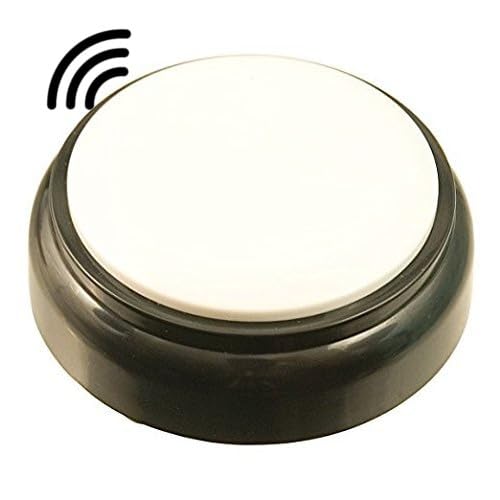
This smaller Cirbic, model tcw001, keeps the same press-to-listen idea in a compact travel-style body for a bedside drawer, a kitchen counter or a bag taken between homes. One large button announces the time, and a further press gives the date, in a voice aimed at elderly and blind users. It runs on two AA batteries, so there is no cable to route and no socket to free up. For someone who wants spoken time without a glowing display or a menu system, this is the simplest format in the guide.
Specs
- Brand: Cirbic
- Model number: tcw001
- Colour: White
- Display type: Digital
- Batteries: 2 AA batteries required
- Clock form: Travel
- Operation mode: Electrical, battery powered
- UPC on the listing: 646278868586
Best for: A portable, battery-only talking clock that can move from room to room.
Watch out for: The listing says AA batteries are required without confirming inclusion, so have a fresh pair ready at setup.
ASIN: B06XPJFB82
Which One Fits Your Situation
No Usable Sight at All
Choose the Cirbic Extra Large Talking Button Clock. With no display to interpret and one oversized button for time, date and alarm, it asks nothing of the user’s eyes. Spoken setup prompts mean adjustments stay independent too, and the high-contrast blue button still helps anyone with a small amount of remaining vision find it quickly.
Medication Prompts in a Familiar Voice
Pick the ORKA Talking Clock when reminders carry the day. A relative can record up to eight messages, so the prompt arrives in a trusted voice at the right hour, and the spoken time, day and date are one press away. Its mains power and loud maximum volume suit a fixed spot in a kitchen or living room.
A Household That Speaks Another Language First
The Mitoart Digital Alarm Clock announces the time in nine languages and shows the full day, month and date without abbreviations, which removes guesswork for users reading in a second language. The GOLOZA 7” Digital Dementia Clock is the alternative when volume control matters more, thanks to its ten announcement levels and hourly chime option.
Night-Time Checks Without Waking the House
For quiet checks in the dark, the Cirbic Talking Large Button Alarm Clock is easy to grab, battery powered and free of a bright screen. If the clock stays in one bedroom instead, either display model works, since both the Mitoart and the GOLOZA dim automatically in the evening and can announce the time without the lights going on.
Common Mistakes
- Buying a display clock for a user who cannot read any screen, when a button-only clock would remove the barrier entirely.
- Ignoring how the clock is set up: if setup needs sighted help for every change, spoken prompts or a remote control should be on the shortlist.
- Placing a mains-powered clock where no socket is free, then discovering its battery only preserves settings rather than running the clock.
- Setting announcement volume once in a quiet shop-like room and never rechecking it against television noise or a closed bedroom door.
- Assuming every talking clock announces the date as well as the time, when some models need a second press and others skip the date altogether.
Frequently Asked Questions
Do talking clocks announce the date as well as the time?
Many do, usually on a second press of the talk button. Both Cirbic button clocks announce the time first and the date on another press, while the ORKA Talking Clock includes the day, month, date and year in its announcement. Always confirm the sequence on the listing for the exact model being ordered.
Can a blind person set one of these clocks without help?
Yes, when the clock gives spoken setup prompts. The Cirbic Extra Large Talking Button Clock uses audio instructions during setting, and the ORKA and display models can be configured by a family member once, after which daily use is a single press. Voice-activated and remote-control models reduce the need to find small rear buttons.
How loud does a talking clock need to be?
Enough to be understood clearly in the room where it will actually be used, over ordinary background noise. The ORKA Talking Clock lists a maximum of 90 decibels for users who are hard of hearing, while the GOLOZA offers ten lower steps for finer control. A wide range matters more than a single loud setting.
Do these clocks keep working during a power outage?
Battery button clocks such as both Cirbic models keep running as long as their cells hold charge. Mains-powered display clocks rely on a backup battery that mainly preserves time and settings, and the display may stay dark until power returns. Check what the listing says the backup actually covers before relying on it.
More from Amazon
Programs that pair well with the guide above. Offers and eligibility are set by Amazon and may change.
Collect the home and kitchen items you want in one registry that guests can shop from.
Create a wedding registrySet up recurring deliveries of everyday items on eligible products. Terms and savings are set by Amazon.
Explore Subscribe & SaveFree shipping on eligible items, Prime Video and more. Eligible new members can start with a free trial.
Start a Prime free trialAudiobooks and podcasts to listen to on the go. Eligible new members can start with a free trial.
Try Audible freeAs an Amazon Associate we earn from qualifying purchases.










Write Your Review
No reviews yet. Be the first to share your experience!