

Key takeaways
- Five adjustable tablet stands that raise your screen to eye level for desk work, reading and video calls, with fold-flat and swivel options compared.
As an Amazon Associate we earn from qualifying purchases.
Disclosure: This article contains affiliate links. If you buy through these links, we may earn a commission at no extra cost to you.
Our top pick: Lamicall Tablet Stand Adjustable. Runner-up: UGREEN Tablet Stand Holder Adjustable.
A tablet lying flat on a desk forces a familiar posture: head tipped forward, shoulders rounded, and one hand busy holding the screen up during a call. Over a short reading session that hardly matters, but across a working day it adds up to a stiff neck, tired wrists, and a camera angle that points up at your chin instead of across at your eyes. A proper desk stand fixes all three problems at once by lifting the tablet, holding it at a tilt you choose, and freeing both hands for a keyboard, a notebook, or a cup of tea.
Small design differences change how a stand feels in daily use. Some fold flat for travel, some swivel toward a colleague, and some grip larger tablets in cases. This guide explains the criteria that matter for posture, stability, and calls, then compares five adjustable stands from Lamicall, UGREEN, OMOTON, LISEN, and AboveTEK.
What to look for in a desk tablet stand
Begin with height and tilt together, because they decide your posture. A stand that only tilts a tablet sitting low on the desk still leaves you looking down. Look for a design that raises the screen and lets you adjust the angle so the top of the tablet sits closer to eye level, especially if you use the tablet as a second screen beside a laptop. Dual hinges or a raised arm usually give a wider useful range than a single low cradle.
Stability comes next. A heavier, wider base resists wobble when you tap, swipe, or write with a stylus. Silicone pads on the base and in the cradle protect the desk and the tablet, and they help stop slow sliding on smooth surfaces. Check the hook or cradle depth against your tablet with its case fitted, since a stand that fits a bare device may not hold the same device in a thick protective case.
Check compatibility by screen size and thickness, not brand alone. Most stands here cover devices from about 4 to 13 inches, with one extending further for portable monitors. Portrait suits documents and reading, landscape suits calls and video, and a rotating base saves reseating the tablet each time you switch.
For calls, think about the camera as much as the screen: the stand should hold the tablet steady where the front camera frames your face without a steep upward angle. Cable access matters too, so look for an open back that lets you plug in while mounted.
Finally, consider storage. A fold-flat model disappears into a drawer or bag for hybrid work, while a fixed kiosk-style stand suits a permanent workstation where the tablet rarely moves.
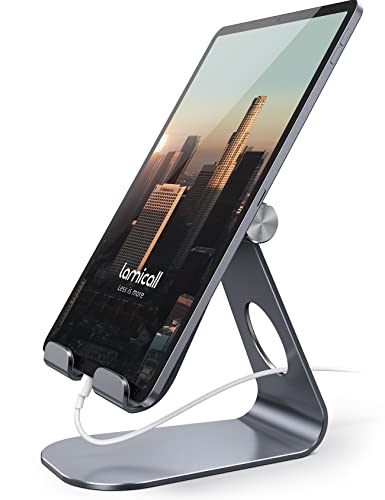
Lamicall Tablet Stand Adjustable
Specs
- Compatibility: tablets and phones from 4 to 13 inches, including iPad, iPad Pro, iPad Air, iPad mini, Galaxy Tab, Surface, and Kindle e-readers
- Hook width: 18 mm (0.71 inches), for a tablet with case fitted up to that thickness
- Material: Al-Ti alloy and strengthened alloy steel
- Viewing: multi-angle tilt, supporting vertical and horizontal viewing
- Protection: rubber padding in the cradle and on the base
The Lamicall is the classic single-cradle desk stand, and its appeal is simplicity. You unfold it, set the tilt, and sit the tablet in a padded hook that holds it securely in either orientation. The alloy construction feels firm for its light weight, and the hinge holds a chosen angle through tapping and scrolling without creeping forward, which makes it dependable for reading long documents at a desk.
Because the cradle accepts devices up to 18 mm thick with a case on, many people can leave a slim case fitted instead of removing it at every session. The open design also leaves room for a charging cable while the tablet is mounted.
This stand suits a tidy desk where the tablet serves for reading, reference, and occasional calls beside a main computer. It does not raise the screen as high as a long-arm design, so pair it with a chair and desk height that already bring your eyes fairly level. For everyday use, it is a balanced first choice.
UGREEN Tablet Stand Holder Adjustable
Specs
- Compatibility: tablets and phones including iPad Pro 11, iPad 9.7 and 10.5, iPad Air, iPad mini, and Galaxy Tab models
- Model: 50748
- Dimensions: 4.72 x 0.79 x 4.21 inches
- Weight: 4.2 ounces
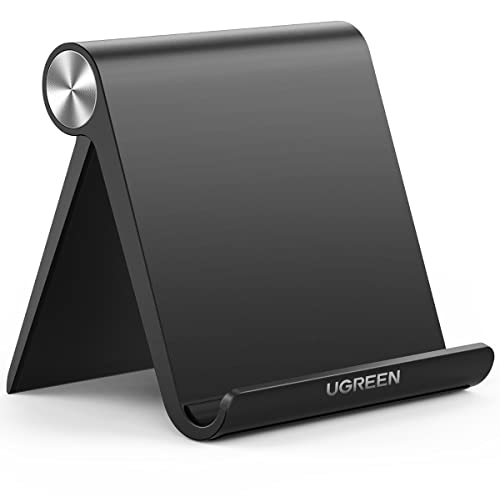
- Design: foldable, multi-angle adjustable desktop dock in black
The UGREEN holder is built for people who carry their stand with them. It folds into a slim, light shape that slips into a laptop bag or a desk drawer, then opens into a multi-angle dock for a tablet or a large phone. That portability makes it a sensible second stand for hybrid work, study spaces, and travel desks where you still want a better viewing angle than propping a tablet against a mug.
On the desk, the adjustable back moves between a steeper angle for calls and reading and a shallower angle for sketching or typing on screen. The compact footprint helps on narrow desks, although very large tablets feel more secure on a wider, heavier base, so centre the device on a flat surface.
Choose the UGREEN for a neat, portable dock that handles a phone, a tablet for notes, and an e-reader without taking over the desk. Its strength is flexibility across places rather than maximum height.
OMOTON T1 Aluminum Tablet Stand

Specs
- Compatibility: tablets up to 13 inches, including iPad Pro 11 and 12.9, iPad Air, iPad mini, iPad 10.2 and 9.7, and Samsung Tab models
- Model: T1 desktop aluminum tablet dock cradle
- Material: aluminum with silicone protection
- Dimensions: about 13 x 11 x 6 cm in listing details
- Features: adjustable, ergonomic, hands-free and portable desktop use
The OMOTON T1 takes a sturdy, no-nonsense approach with an aluminum dock that feels planted on the desk. Its cradle supports larger tablets, including the bigger iPad Pro sizes, which makes it a good fit for people who use a tablet as a genuine work screen for documents, reference material, or a side display during focused work. The silicone protection helps guard both the tablet back and the desk surface during daily repositioning.
Angle adjustment is the core of the T1 experience: upright for reading and calls, eased back for video or following instructions hands-free. The solid build reduces bounce when you tap near the top of a large screen, which also helps during stylus work.
This is a strong choice for a permanent home office or family workspace where the same stand serves several tablets. It favours stability and a clean look over folding flat, so it suits a desk where it can stay out and ready.
LISEN Tablet Stand for Desk, Model 2E56

Specs
- Compatibility: devices from 4 to 15.9 inches, including tablets, phones, e-readers, and portable monitors
- Device thickness: under 0.7 inches; heavy-duty cases are not supported
- Adjustment: height and angle adjustable, folds flat, with a bridge screw adjustment and a stored Allen wrench in the base
- Dimensions: 5.28 x 1.42 x 7.28 inches
- Weight: 0.43 kg in listing details, with silicone anti-slip padding
The LISEN 2E56 stands out for its wide size range and its adjustable, fold-flat frame. Covering devices up to 15.9 inches means it can hold a large tablet one day and a portable monitor the next, which is useful if your desk setup changes between work tasks. Dual adjustment for height and angle gives you more control over eye level than a fixed cradle, helping you align the tablet beside a laptop screen.
A thoughtful detail is the stored adjustment tool in the base: if a joint loosens, you can tighten it and restore a firm hold instead of putting up with sag during a call. Silicone padding helps it stay put on smooth desks.
Check case thickness first, since the listing limits devices to under 0.7 inches and excludes heavy-duty cases. With a bare tablet or slim case, it offers one of the most adaptable setups here, for readers alternating between portrait and landscape and for workers wanting one stand for a tablet and a portable monitor.
AboveTEK Retail Kiosk iPad Stand, TS-138W
Specs
- Compatibility: tablets with screens from 6 to 13 inches, including iPad, iPad Pro, iPad Air, and iPad mini models listed by the maker
- Model: TS-138W
- Rotation: 360-degree swivel with tilt for desktop viewing
- Dimensions: 7.1 x 7.1 x 10.6 inches
- Weight: 1.5 pounds, with a wide desktop base
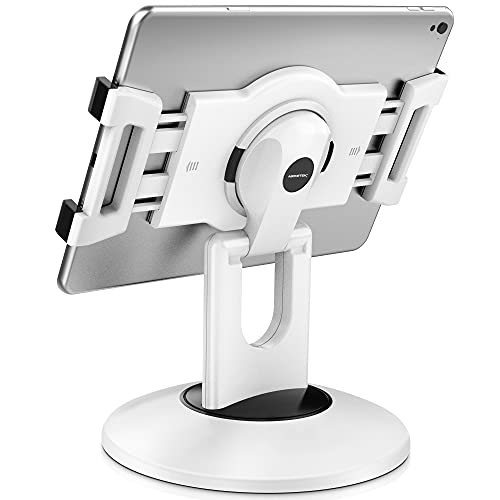
The AboveTEK is the most fixed and substantial option here, designed in a kiosk style for a desk where the tablet stays in place. Its wide base and higher stance lift the screen well above the desk surface, and the 360-degree swivel lets you turn the tablet toward a visitor, a colleague, or a customer without lifting the whole stand. That makes it well suited to a reception area, a shared family desk, a point-of-information setup at home, or a workstation where you regularly show the screen to someone beside you.
For personal desk work, the same qualities give a stable platform for calls and reference use, with one-handed turning. It takes more desk space than folding models, so choose it when a permanent position is part of the plan.
Pick the AboveTEK if you value height, swivel, and a stay-put base above portability. Where the tablet acts as a dedicated call or reference screen, that permanence is a genuine advantage.
Comparison summary
For the simplest everyday desk, the Lamicall offers a padded, case-friendly cradle and dependable tilt in a compact form. For portability, the UGREEN folds light and small while still covering the angles most readers and callers need. For a planted, professional-feeling dock for larger tablets, the OMOTON T1 brings aluminum solidity and a steady cradle. For the widest device range, including portable monitors, and for height plus angle control in a folding frame, the LISEN 2E56 is the most adaptable. For a permanent, higher, swivelling position, the AboveTEK kiosk stand is in a class of its own.
Think about your main task first. Reading rewards a firm tilt, long calls reward height and a steady camera position, and second-screen work rewards alignment beside your laptop. Any of the five will improve your posture compared with a tablet lying flat.
FAQ
How high should a tablet stand raise the screen for desk work?
Aim for a position where you can look at the centre of the screen with your head level and your shoulders relaxed, rather than tipping your chin down. The exact height depends on your chair, desk, and tablet size, so choose a stand with tilt and, if possible, height adjustment, then set it beside your main screen and adjust until looking across feels natural during a full work session.
Can I keep my tablet case on with a desk stand?
Often yes, but always check the cradle depth or hook width against the tablet and case together. The Lamicall listing gives an 18 mm hook width, while the LISEN 2E56 states a limit under 0.7 inches and notes that heavy-duty cases are not supported. A slim case usually fits most stands in this guide, while a thick rugged case may need to be removed or paired with a deeper cradle design.
Which stand style is best for video calls?
A stable stand that lifts the tablet so the front camera sits near eye level and holds that angle without drifting works best for calls. Swivel designs such as the AboveTEK help when you need to turn the screen, while adjustable folding designs such as the LISEN and Lamicall let you fine-tune the tilt for a natural framing. Whichever style you choose, test your framing before an important call and plug in power if the session will be long.
Will a tablet stand also work for reading in portrait mode?
Yes, provided the stand supports portrait orientation and the cradle holds the tablet securely along its shorter edge. All five stands here are intended for vertical and horizontal viewing or for easy repositioning between them, but larger tablets feel most secure in portrait on a wider, heavier base. For long reading sessions, set a slightly reclined angle and raise the screen so you are not bending your neck toward the desk.
Conclusion
A good desk tablet stand is a small change with a daily payoff: a higher screen, a steadier call picture, and hands free for work. This guide covers the main desk uses, from the portable UGREEN and adaptable LISEN to the planted OMOTON and swivelling AboveTEK, with the Lamicall as a dependable all-round cradle. Match the stand to your tablet size, case, and whether it will travel or stay put, and a flat, awkward setup becomes a comfortable workstation.
More from Amazon
Programs that pair well with the guide above. Offers and eligibility are set by Amazon and may change.
Collect the home and kitchen items you want in one registry that guests can shop from.
Create a wedding registrySet up recurring deliveries of everyday items on eligible products. Terms and savings are set by Amazon.
Explore Subscribe & SaveFree shipping on eligible items, Prime Video and more. Eligible new members can start with a free trial.
Start a Prime free trialAudiobooks and podcasts to listen to on the go. Eligible new members can start with a free trial.
Try Audible freeAs an Amazon Associate we earn from qualifying purchases.



Write Your Review
No reviews yet. Be the first to share your experience!