

Key takeaways
- Compare the best monitor arms on weight capacity, adjustment range, mounting style and cable management to position screens at a comfortable height.
As an Amazon Associate we earn from qualifying purchases.
Disclosure: This article contains affiliate links. If you buy through these links, we may earn a commission at no extra cost to you.
Our top pick: Ergotron LX Single Monitor Arm. Runner-up: Ergotron LX Dual Monitor Arm.
Introduction
A monitor that sits on its factory stand is stuck at one height, one angle, and one distance from your eyes. If that fixed position is even slightly wrong, you spend the day leaning forward, tilting your head down, or twisting toward a second screen. An articulating monitor arm solves the geometry problem directly. It clamps to the back edge of the desk, lifts the screen off the surface, and lets you raise, lower, tilt, swivel, and rotate the display until it sits exactly where your neck and shoulders want it.
The best monitor arms also give you back the desk space the old stand used to occupy. Once the screen floats, the area underneath becomes usable again for a notebook, a keyboard tray, or simply a cleaner work surface, and built-in cable channels keep power and display leads from dangling behind the desk.
This guide compares five articulating arms, from a premium single arm and a matched dual-arm setup to mechanical-spring and ultrawide models. Every pick below is a true arm with moving joints, not a fixed riser or a static stand, and each one is matched to a different kind of desk and screen.
How to Choose the Best Monitor Arms
Begin with weight, because an arm only works well inside its rated capacity range. Weigh your monitor without its stand, or check the manufacturer’s listed weight, and pick an arm whose range includes that figure with room to spare. A screen that is too heavy will slowly drift downward, while one that is too light for a strong spring arm may refuse to stay down. Capacity is printed as a range for spring and counterbalance models, so check both the minimum and the maximum, not just the headline number.
Next, confirm the VESA pattern. Most monitors in this class use 75x75mm or 100x100mm mounting holes, and all five arms here support both patterns. If your monitor has a recessed mounting area, check whether the arm’s plate fits into the recess or whether you need spacers.
Then decide how the arm attaches to the desk. A C-clamp grips the edge and suits most desks, while a grommet mount passes through a cable hole or a drilled opening for a cleaner look and a firmer hold on thicker tops. Check the clamp’s thickness range against your desktop, especially if you use a standing desk with a deep rear frame.
Adjustment range is the next filter. Look at lift height if you alternate between sitting and standing, at extension if your desk is deep, and at tilt and rotation if you share your screen with a colleague or switch between landscape documents and portrait code. Finally, consider cable management: arms with clips or channels along the segments keep leads tidy and stop cables from pulling when you move the screen.
Ergotron LX Single Monitor Arm

The Ergotron LX in matte black is the reference point for single-screen arms. Its Constant Force spring mechanism is tuned for monitors from 7 to 25 pounds, which covers the great majority of displays up to 34 inches, and it holds position smoothly without the slow sag that cheaper arms develop. The arm raises the screen with 13 inches of lift, extends deep over the desk, and rotates a full circle, so moving from a seated position to a standing desk takes one light push.
Installation is flexible: the box includes both a two-piece desk clamp and a grommet mount, so the same arm works on a plain slab desk or through an existing cable hole. Cable management is built into the arm segments, keeping leads hidden along the underside. Ergotron backs the LX with a long warranty and a modular design that accepts add-on parts later, which makes it the easiest arm here to recommend for a desk you adjust many times a day.
Specs
- Screen size: up to 34 inches, single monitor
- Weight capacity: 7 to 25 lb
- VESA patterns: 75x75mm and 100x100mm
- Mounting: desk clamp for tops 0.4 to 2.4 inches thick, plus grommet mount for tops up to 2.25 inches
- Adjustment: 13 inches of lift, 75 degrees of tilt, 360-degree rotation
- Model: 45-241-224, matte black, with integrated cable management
Ergotron LX Dual Monitor Arm

Two separate arms rarely line up perfectly, which is why a matched dual setup matters for side-by-side work. The Ergotron LX Dual carries two monitors of up to 27 inches each on a shared base, with each arm rated for 7 to 20 pounds. Because both sides use the same LX mechanism, the screens sit at matching heights, move with the same smooth resistance, and stay aligned when you nudge one of them.
Each screen can be raised, tilted, swiveled, and rotated independently, so you can keep a primary display centered and angle the secondary one toward you, or turn one screen to portrait for long documents. The shared base also keeps the rear of the desk tidier than two clamps competing for edge space, and the cable routing keeps four leads — power and signal for each screen — under control. For a permanent two-screen workstation, this is the most polished option in the group.
Specs
- Configuration: dual arms on one desk mount, two monitors
- Screen size: up to 27 inches per screen
- Weight capacity: 7 to 20 lb per arm
- VESA patterns: 75x75mm and 100x100mm per screen
- Mounting: VESA desk mount with clamp and grommet hardware
- Model: 45-245-224, matte black
HUANUO Single Monitor Arm (HNSS8)
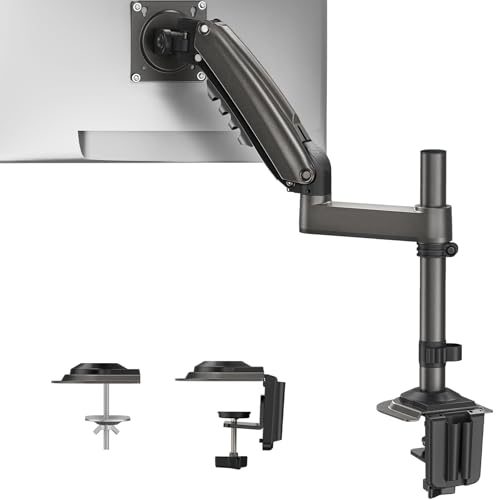
The HUANUO HNSS8 is a gas-spring arm built around height. It raises a screen to a maximum height of 22.44 inches, which suits taller users and sit-stand desks where the display needs to travel a long way up. The arm fits screens from 13 to 32 inches weighing up to 19.8 pounds, a range that covers most mainstream home-office monitors, and the gas spring lets you reposition the screen with one hand once the tension is dialed in for your display’s weight.
The full-motion head tilts and swivels so you can cut glare from a nearby window or share the screen with someone beside you. Mounting uses the familiar pairing of a C-clamp and a grommet base, so it installs on most desks without drilling. If your main complaint is a screen that sits too low and a stand that cannot be raised, this arm’s tall travel is its strongest argument.
Specs
- Screen size: 13 to 32 inches, single monitor
- Weight capacity: up to 19.8 lb (range begins at 4.4 lb)
- Maximum height: 22.44 inches
- VESA patterns: 75x75mm and 100x100mm
- Mounting: C-clamp and grommet base options
- Model: HNSS8, gas-spring full-motion arm
VIVO Single Monitor Arm (STAND-V001O)

The VIVO STAND-V001O takes a different mechanical approach: a counterbalance mechanical spring instead of a gas cylinder. Mechanical springs hold their tension consistently over time, and this design allows toolless placement — you move the screen by hand and it stays where you leave it. The arm fits screens from 17 to 32 inches weighing 4.4 to 19.8 pounds, and the mounting bracket offers an unusually wide tilt range for fine control of viewing angle.
Setup details are well thought out. The open-top VESA plate lets the monitor slide on rather than being held in place while you hunt for screws, and the clamp adjusts for both thin and thick desktops, with a grommet option for tops in the thinner range. Integrated cable management runs along the arm. One practical note from the manual: the back of the arm extends past the rear edge of the desk at some angles, so leave a little clearance behind your workstation. For buyers who want simple, spring-balanced movement without gas parts, this is a sound, proven design.
Specs
- Screen size: 17 to 32 inches, single monitor
- Weight capacity: 4.4 to 19.8 lb
- VESA patterns: 75x75mm and 100x100mm, open-top slide-on plate
- Adjustment: tilt +90 to -90 degrees, 180-degree swivel, 360-degree rotation
- Mounting: clamp for desktops 0.4 to 3.1 inches thick depending on configuration, plus grommet option
- Model: STAND-V001O, mechanical-spring counterbalance arm with cable management
HUANUO Ultrawide Monitor Arm with USB (HNSS7)
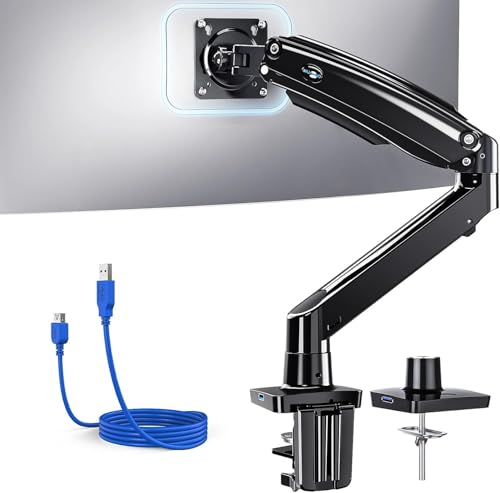
Ultrawide monitors are wide, heavy, and awkward on a normal stand, and they need an arm with real holding power. The HUANUO HNSS7 is rated for screens up to 40 inches and holds up to 26.48 pounds, which covers large curved ultrawides that exceed the limits of standard arms. Its upgraded adjustable design keeps that weight steady while still allowing tilt, swivel, and height changes for a comfortable viewing position.
A detail that sets this model apart is the built-in USB connection in the base, which gives you a reachable port for a headset receiver, a flash drive, or a charging lead without reaching around the back of a computer tower. Mounting is the standard pairing of C-clamp and grommet base, and the VESA plate supports both common patterns. If your single screen is a big ultrawide, this is the arm in the group built for it.
Specs
- Screen size: ultrawide screens up to 40 inches, single monitor
- Weight capacity: up to 26.48 lb
- VESA patterns: 75x75mm and 100x100mm
- Mounting: C-clamp and grommet base options
- Extra feature: built-in USB port in the base
- Model: HNSS7, upgraded adjustable arm
Comparison Summary
All five arms free the screen from its stand, but they suit different desks. The Ergotron LX Single is the refined all-rounder for one mainstream monitor, with the widest useful capacity range and the smoothest movement. The Ergotron LX Dual applies the same engineering to two 27-inch screens on one base. The HUANUO HNSS8 stands out for maximum lift height on a single screen. The VIVO STAND-V001O offers mechanical-spring counterbalance movement, toolless placement, and the widest tilt range here. The HUANUO HNSS7 carries the heaviest load, up to 26.48 pounds, for large ultrawide displays, and adds a base USB port. Every model supports both 75x75mm and 100x100mm VESA patterns and offers clamp mounting, with grommet hardware included across the group.
Frequently Asked Questions
Will a monitor arm work with my desk?
Most likely, yes, if the rear edge is accessible and the desktop falls inside the clamp’s thickness range. The arms here clamp to tops from about 0.4 inches up to roughly 2.4 to 3.1 inches depending on the model and configuration, and all of them include a grommet option that works through a cable hole. Glass desks and desks with a deep rear apron are the usual problem cases, so check the edge before ordering.
How do I know if my monitor fits an arm?
Check two things: the VESA pattern and the weight without the stand. If the back of your monitor has four screw holes in a 75x75mm or 100x100mm square, every arm in this guide mounts to it. Then match the monitor’s weight to the arm’s rated range, remembering that spring arms have a minimum as well as a maximum. A monitor below the minimum may creep upward, and one above the maximum will sag.
Can one arm hold an ultrawide monitor?
Yes, provided the weight fits the arm’s capacity range. Width alone is not the limiting factor; the arm holds the monitor at its center VESA plate, so pounds matter more than inches. The HUANUO HNSS7 in this guide is rated for ultrawide screens up to 40 inches and 26.48 pounds, which covers most large curved displays. Very heavy ultrawides should be matched to the top of an arm’s range with care.
Do monitor arms damage desks?
A properly tightened clamp spreads its load over a pad and normally leaves no mark. To be safe, clean the edge before installing, avoid overtightening beyond firm resistance, and add a thin protective pad on delicate finishes. The VIVO manual also advises keeping the monitor positioned over the desktop rather than swung out past the edge, which protects both the desk and the mount.
Conclusion
The right monitor arm turns a fixed screen into a movable one, and that single change improves posture, reclaims desk space, and tidies cables at the same time. Choose the Ergotron LX Single for the smoothest everyday adjustment, the LX Dual for a matched two-screen setup, the HUANUO HNSS8 for maximum height, the VIVO STAND-V001O for mechanical-spring simplicity, or the HUANUO HNSS7 for a heavy ultrawide. Match the weight range and VESA pattern first, and any of these arms will hold your screen exactly where you want it.
More from Amazon
Programs that pair well with the guide above. Offers and eligibility are set by Amazon and may change.
Collect the home and kitchen items you want in one registry that guests can shop from.
Create a wedding registrySet up recurring deliveries of everyday items on eligible products. Terms and savings are set by Amazon.
Explore Subscribe & SaveFree shipping on eligible items, Prime Video and more. Eligible new members can start with a free trial.
Start a Prime free trialAudiobooks and podcasts to listen to on the go. Eligible new members can start with a free trial.
Try Audible freeAs an Amazon Associate we earn from qualifying purchases.


Write Your Review
No reviews yet. Be the first to share your experience!