

Key takeaways
- Compare the best mesh WiFi systems on coverage area, speed class, node count and parental controls to end dead zones in every room of the house.
As an Amazon Associate we earn from qualifying purchases.
Disclosure: This article contains affiliate links. If you buy through these links, we may earn a commission at no extra cost to you.
Our top pick: TP-Link Deco XE75 (3-Pack). Runner-up: Amazon eero 6+ (3-Pack).
Why a Mesh Kit Ends Dead Zones
A single router parked next to the modem has to push its signal through every wall, floor and appliance between it and the far bedroom, and by the time it gets there the connection is often too weak for a video call or a streamed film. A mesh WiFi system solves that problem differently. Instead of one loud transmitter, you place two or three matching nodes around the house, and those nodes work as one network with one name and one password. Your phone, laptop and television hand themselves from node to node as you move, without dropping the connection or asking you to reconnect.
That design makes mesh the practical choice for a home office as well as for family living. The desk in the spare room, the smart television in the den and the laptop on the kitchen table all draw from the nearest node rather than competing for a distant one. This guide compares five whole-home mesh kits on the things that decide whether a network feels effortless: coverage area, speed class, node count and parental controls. Every pick below is a complete multi-node kit, sold and named by its pack size, so you can match the kit to the footprint of your house and the way your household actually works.
How to Choose the Best Mesh WiFi System
Coverage area comes first. Manufacturers quote a total figure for the full pack, and you should compare that figure with the size of your home, then allow extra headroom for thick walls, brick chimneys and floors that block signal. A three-node kit suits most two-storey houses, because you can put one node on each floor and one near the room where the signal usually dies. Homes with an L-shaped layout or a detached office benefit from that third node even more than raw square footage suggests.
Speed class tells you how much combined bandwidth the kit can move and how well it holds up when many devices work at once. Dual-band WiFi 6 kits handle everyday streaming, browsing and video calls comfortably. Tri-band kits add a third radio, which can carry traffic between nodes and leave the other bands freer for your devices. WiFi 6E kits go further by opening the 6 GHz band, which helps newer laptops and phones in crowded neighbourhoods where the older bands are busy.
Node count and port layout matter for placement. Each node needs a power outlet in an open spot, roughly halfway between the main node and the room it serves. Wired Ethernet ports on the nodes let you plug in a desktop, a printer or a television that never moves, and wired backhaul between nodes gives the most stable link of all when your house already has Ethernet cabling.
Parental controls deserve a close look in a family home. The better kits let you build a profile for each person, pause the internet on a schedule, filter content by age and see which devices are online. Finally, consider the app. Setup, guest access, firmware updates and troubleshooting all happen there, so a clear app saves real time over the life of the network.
TP-Link Deco XE75 (3-Pack)

The TP-Link Deco XE75 (3-pack) is the kit to shortlist when you want the newest band and the widest coverage in this line-up. Its three units blanket up to 7,200 square feet, and because it is a WiFi 6E system, the 6 GHz band gives compatible devices a clear lane and can also carry traffic between the nodes themselves.
Specs
- Speed class: AXE5400 tri-band WiFi 6E across 2.4 GHz, 5 GHz and 6 GHz
- Coverage: up to 7,200 sq. ft. with the 3-pack
- Node count: 3 Deco XE75 units in the box
- Device support: up to 200 connected devices
- Ports: 3 Gigabit Ethernet ports on each unit
- Controls: TP-Link HomeShield parental controls with per-person profiles, plus AI-Driven Mesh that learns your layout
In daily use, the XE75 (3-pack) suits larger homes where several people work, stream and game at the same time. The Deco app walks you through placement, and the system steers devices toward the strongest node automatically. If your internet plan is fast and your devices are recent, this is the most future-ready kit here.
Amazon eero 6+ (3-Pack)

The Amazon eero 6+ (3-pack) is built for households that want the network to disappear into the background. Three compact units cover up to 4,500 square feet, the TrueMesh software routes traffic intelligently between them, and the whole system is managed from a calm, plain-language app that most people find set up in minutes.
Specs
- Speed class: AX3000 dual-band WiFi 6, supporting internet plans up to a gigabit
- Coverage: up to 4,500 sq. ft. with the 3-pack
- Node count: 3 eero 6+ units in the box
- Device support: 75 or more connected devices
- Hardware: 1 GHz dual-core processor, 512 MB RAM and 4 GB flash storage in each unit
- Extras: built-in Thread and Zigbee smart home hub, Alexa voice control, automatic security updates
The eero 6+ (3-pack) fits apartments and mid-sized houses especially well, and it doubles as the hub of a smart home thanks to its Thread and Zigbee radios. Parental controls live in the app, where you can pause access by profile and set schedules. Choose this kit if simple management matters as much as raw speed.
TP-Link Deco X20 (3-Pack)
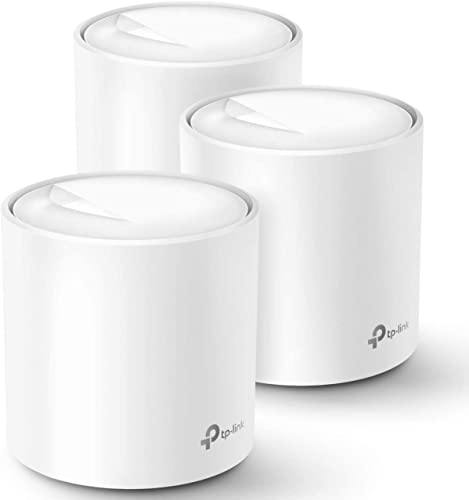
The TP-Link Deco X20 (3-pack) brings WiFi 6 coverage to bigger floor plans without stepping up to a tri-band design. Three units cover up to 5,800 square feet and keep as many as 150 devices connected, which makes this kit a strong fit for busy family homes full of phones, tablets, consoles and smart plugs.
Specs
- Speed class: AX1800 dual-band WiFi 6 with OFDMA and MU-MIMO
- Coverage: up to 5,800 sq. ft. with the 3-pack
- Node count: 3 Deco X20 units in the box
- Device support: up to 150 connected devices
- Ports: 2 Gigabit Ethernet ports on each unit, 6 in total, with support for wired Ethernet backhaul
- Controls: TP-Link HomeShield parental controls with custom profiles, time limits and content filtering
Placement is flexible because every X20 unit is identical, so any of them can serve as the main node beside the modem. The Deco app reports which devices are online and lets you prioritise a work laptop during the day. For a two-storey house that needs dependable coverage in every bedroom, the X20 (3-pack) is a balanced, sensible pick.
TP-Link Deco M5 (3-Pack)

The TP-Link Deco M5 (3-pack) is the long-running favourite for smaller homes and for anyone whose devices are mostly WiFi 5 generation. Its three low, round units cover up to 5,500 square feet, and the system has a mature set of family tools that have been refined over years of updates.
Specs
- Speed class: AC1300 dual-band WiFi 5 across 2.4 GHz and 5 GHz
- Coverage: up to 5,500 sq. ft. with the 3-pack
- Node count: 3 Deco M5 units in the box
- Device support: more than 100 connected devices
- Ports: 2 Gigabit Ethernet ports on each unit, with support for wired Ethernet backhaul
- Controls: TP-Link HomeCare parental controls with content filtering, time limits and monthly usage reports, plus built-in antivirus protection
The M5 (3-pack) handles browsing, schoolwork, music and high-definition streaming without fuss, and its adaptive routing quietly picks the fastest path for each device. It will not match the WiFi 6 kits for sheer throughput when dozens of devices compete, but for a flat, a bungalow or a compact house it remains an easy system to live with.
Google Wifi (3-Pack)

The Google Wifi (3-pack) takes the friendliest approach of the five. Three identical Wifi points, model NLS-1304-25, create one network that Google Home manages for you, and the system leans on its Network Assist software to keep every device on the clearest channel and the fastest band without any manual tuning.
Specs
- Speed class: AC1200 dual-band WiFi 5 across 2.4 GHz and 5 GHz
- Coverage: whole-home mesh coverage from 3 Wifi points, one point per area of the home
- Node count: 3 Google Wifi points in the box
- Model: NLS-1304-25, each point measuring 4.17 x 4.17 x 2.7 inches
- Controls: app-based family controls to pause WiFi by device or group, guest network and device prioritising
- Maintenance: automatic software updates handled by the system itself
Because every point is the same, expanding or rearranging the network is painless: unplug a point, move it to the room that needs help, and let the app confirm the placement. The Google Wifi (3-pack) suits households that value guidance over granular settings, and it keeps older laptops and tablets connected just as happily as newer ones.
Comparison Summary
All five kits replace a single router with a team of nodes, but they aim at different homes. The Deco XE75 (3-pack) offers the largest coverage figure here at 7,200 square feet and the only 6 GHz band, making it the pick for big houses and newer devices. The eero 6+ (3-pack) covers 4,500 square feet with the simplest app and adds a smart home hub, which suits connected households that want minimal upkeep. The Deco X20 (3-pack) splits the difference, with 5,800 square feet of WiFi 6 coverage and room for 150 devices.
The two WiFi 5 kits still earn their place. The Deco M5 (3-pack) pairs 5,500 square feet of coverage with the deepest set of built-in family protections in this group, while the Google Wifi (3-pack) offers the gentlest learning curve and fully automatic upkeep. Count your floors, note where the signal dies today, and match the pack to that map rather than buying coverage you will never use.
Frequently Asked Questions
How many mesh nodes does my house actually need?
Start with the coverage figure for the full pack and compare it with your floor area, then think about shape as much as size. A compact flat usually thrives on a well-placed three-node kit with one node left near the bedrooms, while a long or two-storey house uses all three nodes spread along its length. Walls, floors and metal appliances shrink real coverage, so placing nodes in open hallways rather than inside cupboards makes a bigger difference than adding hardware.
Can I mix a mesh kit with my existing modem and internet plan?
Yes. Every kit in this guide connects to the modem your provider supplied, and the main node simply takes over the job of running your home network. Mesh systems work with cable, fibre and DSL services alike, and your plan speed stays the same; the kit decides how well that speed is shared around the house. If your provider gave you a combined modem and router unit, the app for your chosen kit will explain the quick setting change that lets the two work together cleanly.
What is the difference between dual-band and tri-band mesh?
A dual-band kit broadcasts on the 2.4 GHz and 5 GHz bands and shares those bands between your devices and the traffic passing between nodes. A tri-band kit adds a third radio, usually a second 5 GHz band or the 6 GHz band on WiFi 6E models such as the Deco XE75 (3-pack), which can be dedicated to node-to-node traffic. Homes with many simultaneous streams, calls and downloads feel the benefit most, because device traffic no longer competes with the mesh backbone.
Do mesh systems let me control what my children can access?
The kits here all include parental controls of some form, managed from the companion app. You can typically create a profile for each child, group their devices under it, filter content by category or age, set bedtime schedules and pause the internet instantly. TP-Link systems add usage reports through HomeCare or HomeShield, while eero and Google Wifi focus on simple pausing and scheduling. Set the profiles up on day one, before the network becomes part of the furniture.
Conclusion
Dead zones are a placement problem, and mesh is the fix that treats the whole house at once. Pick the Deco XE75 (3-pack) for the widest coverage and the 6 GHz band, the eero 6+ (3-pack) for the calmest app and smart home duties, or the Deco X20 (3-pack) for WiFi 6 reach across a family floor plan. The Deco M5 (3-pack) and Google Wifi (3-pack) remain welcoming choices for smaller homes and simpler needs. Whichever kit you choose, spread the nodes out, keep them in the open, and let the system do the roaming work for you.
More from Amazon
Programs that pair well with the guide above. Offers and eligibility are set by Amazon and may change.
Collect the home and kitchen items you want in one registry that guests can shop from.
Create a wedding registrySet up recurring deliveries of everyday items on eligible products. Terms and savings are set by Amazon.
Explore Subscribe & SaveFree shipping on eligible items, Prime Video and more. Eligible new members can start with a free trial.
Start a Prime free trialAudiobooks and podcasts to listen to on the go. Eligible new members can start with a free trial.
Try Audible freeAs an Amazon Associate we earn from qualifying purchases.




Write Your Review
No reviews yet. Be the first to share your experience!