

Key takeaways
- Compare the best WiFi extenders on WiFi standard, coverage area, band support and setup method to fix dead zones and keep a strong signal in every room.
As an Amazon Associate we earn from qualifying purchases.
Disclosure: This article contains affiliate links. If you buy through these links, we may earn a commission at no extra cost to you.
Our top pick: TP-Link RE605X AX1800 WiFi 6 Range Extender. Runner-up: TP-Link RE550 AC1900 WiFi Range Extender.
A weak WiFi signal rarely fails everywhere at once. It fades in the back bedroom, drops in the home office at the end of the hall, and stalls in the kitchen just when a video call matters most. Thick walls, long floor plans, and a router tucked into one corner all eat into the signal before it reaches the rooms where you actually sit, work, and stream. A single-unit WiFi range extender is the simplest fix: it plugs into a wall outlet partway between your router and the dead zone, picks up the existing network, and rebroadcasts it so the far rooms get a usable connection.
This guide compares five plug-in extenders from TP-Link and NETGEAR, covering both WiFi 6 and WiFi 5 models, from a compact AC750 unit suited to one stubborn room to an AX1800 WiFi 6 model built for busier households. Every pick works with the router you already own, so there is no need to replace your current network hardware.
What to Look for in a WiFi Extender
Begin with the WiFi standard. WiFi 6 (802.11ax) extenders handle many devices more efficiently thanks to OFDMA and MU-MIMO, which let the extender talk to several devices in an organized way instead of making them wait in line. WiFi 5 (802.11ac) models remain a sensible match for older routers and lighter use, such as browsing, email, and streaming in a spare room. Matching the extender’s standard to your router keeps the link between them as capable as possible.
Next, look at the speed class and band support. Dual-band extenders split their headline speed between the 5 GHz band, which is faster over shorter distances, and the 2.4 GHz band, which travels farther and passes through walls more easily. An AX1800 or AC1900 class extender suits streaming and video calls in the extended area, while an AC750 or AC1200 class unit is aimed at basic connectivity. A wireless extender shares its link with your router, so real-world speeds in the far room will always sit below the headline figures.
Coverage area and device counts give a rough sense of scale: figures such as 1,000 to 2,200 square feet describe the added area the extender is designed to serve under favorable conditions, and real results depend on wall materials and placement. Finally, check for an Ethernet port, which lets you wire in a desktop, smart TV, or game console, and on many models enables an access point mode that turns a wired outlet into a fresh wireless source.
TP-Link RE605X AX1800 WiFi 6 Range Extender

The TP-Link RE605X is the WiFi 6 option in this roundup, the natural pick if your router already runs WiFi 6 or your household keeps adding connected devices. Its AX1800 class splits into 1201 Mbps on the 5 GHz band and 574 Mbps on the 2.4 GHz band, and WiFi 6 features such as OFDMA and MU-MIMO help it serve phones, laptops, and smart home gear at the same time without the slowdowns that appear on older hardware when everyone is online at once.
Two external antennas and an intelligent signal indicator help with placement, the single biggest factor in how well any extender performs. TP-Link rates the RE605X for coverage up to 1,500 square feet and up to 30 devices, and it supports OneMesh with compatible TP-Link routers, letting the extender share the router’s network name so devices move between the two without manual switching. The single Gigabit Ethernet port gives a wired option for a desk setup or a streaming box, and access point mode lets the same port convert an existing wired connection into a WiFi 6 access point.
Specs
- WiFi standard: WiFi 6 (802.11ax), dual-band
- Speed class: AX1800, up to 1201 Mbps on 5 GHz and 574 Mbps on 2.4 GHz
- Coverage: up to 1,500 sq. ft., up to 30 devices
- Ethernet: 1 Gigabit Ethernet port, access point mode supported
- Antennas: 2 external antennas with intelligent signal indicator
- Setup: TP-Link Tether app or WPS button; OneMesh compatible
TP-Link RE550 AC1900 WiFi Range Extender

The TP-Link RE550 is the widest-coverage WiFi 5 model here. Its AC1900 class delivers up to 1300 Mbps on the 5 GHz band and 600 Mbps on the 2.4 GHz band, and three adjustable external antennas push the signal toward the rooms that need it. TP-Link rates it for up to 2,100 square feet of added coverage and up to 32 devices, a good fit for larger homes where the dead zone spans more than one room.
Because it is a 3×3 design on the 5 GHz band, the RE550 holds up well when several people stream or join calls through the extender at once. An intelligent signal light helps you find an outlet where the extender still receives a strong feed from the router. The Gigabit Ethernet port covers wired needs at a desk or entertainment center, built-in access point mode turns a wired connection into a dual-band wireless source, and setup is handled in the Tether app or through WPS.
Specs
- WiFi standard: WiFi 5 (802.11ac), dual-band
- Speed class: AC1900, up to 1300 Mbps on 5 GHz and 600 Mbps on 2.4 GHz
- Coverage: up to 2,100 sq. ft., up to 32 devices
- Ethernet: 1 Gigabit Ethernet port, access point mode supported
- Antennas: 3 adjustable external antennas with intelligent signal light
- Setup: TP-Link Tether app or WPS button; EasyMesh compatible
TP-Link RE315 AC1200 WiFi Extender
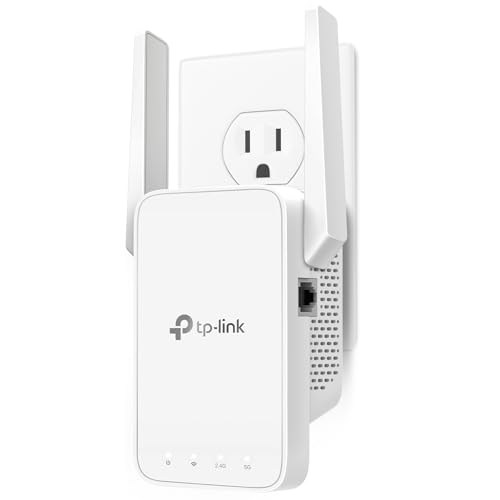
The TP-Link RE315 covers the everyday case: one or two rooms where the signal fades, in a home that mainly needs reliable browsing, streaming, and video calls. Its AC1200 class provides up to 867 Mbps on the 5 GHz band and 300 Mbps on the 2.4 GHz band, and TP-Link rates it for up to 1,500 square feet of coverage and up to 30 devices, plenty for a bedroom, a small office, or a living room on the far side of the house.
The RE315 supports TP-Link OneMesh, so paired with a compatible TP-Link router it can share one network name and let devices roam between router and extender without dropping to a separate network. A smart signal indicator light shows whether the outlet you picked receives a strong enough feed, taking the guesswork out of placement. Its single Ethernet port works in two directions: wire in a device such as a smart TV or game console for a steadier link, or switch the unit to access point mode and feed it a wired connection to create a new wireless source. Setup runs through the Tether app, a web browser, or WPS.
Specs
- WiFi standard: WiFi 5 (802.11ac), dual-band
- Speed class: AC1200, up to 867 Mbps on 5 GHz and 300 Mbps on 2.4 GHz
- Coverage: up to 1,500 sq. ft., up to 30 devices
- Ethernet: 1 Ethernet port, access point mode supported
- Antennas: internal design with smart signal indicator light
- Setup: TP-Link Tether app, web browser, or WPS button; OneMesh compatible
NETGEAR EX6120 AC1200 WiFi Range Extender
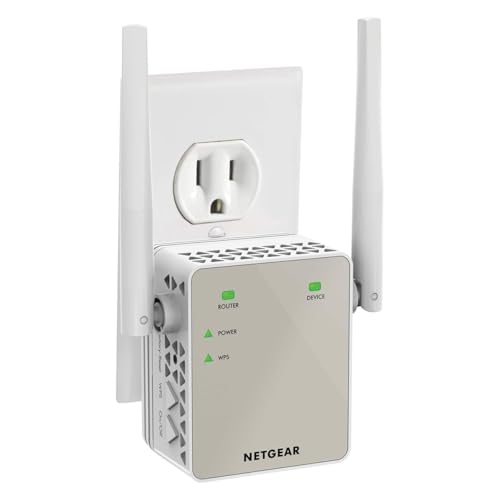
The NETGEAR EX6120 is a compact wall-plug extender in the same AC1200 class as the RE315, delivering up to 900 Mbps on the 5 GHz band and 300 Mbps on the 2.4 GHz band. NETGEAR rates it for up to 1,500 square feet of added coverage and up to 25 devices, which suits an apartment or a house where a hallway, bedroom, or garage workspace sits just outside the router’s comfortable reach.
Two external antennas distinguish it from fully internal designs and can help aim coverage down a hallway or across an open-plan space. The EX6120 works with any standard router. A Fast Ethernet port on the side lets you wire in a printer, console, or desktop near the extender, setup is a short WPS pairing or a browser-based assistant, and the small wall-plug body leaves the second outlet free in most installations.
Specs
- WiFi standard: WiFi 5 (802.11ac), dual-band
- Speed class: AC1200, up to 900 Mbps on 5 GHz and 300 Mbps on 2.4 GHz
- Coverage: up to 1,500 sq. ft., up to 25 devices
- Ethernet: 1 Fast Ethernet port
- Antennas: 2 external antennas, compact wall-plug design
- Setup: WPS button or web browser assistant; works with any standard router
NETGEAR EX3700 AC750 WiFi Range Extender
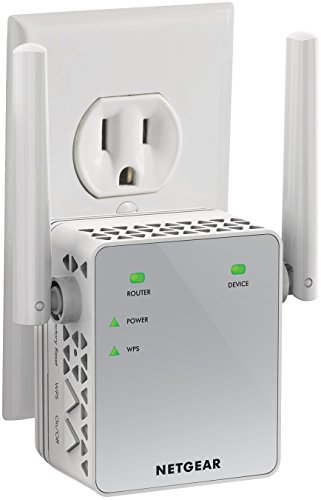
The NETGEAR EX3700 is the smallest unit in this group, aimed at a single problem room rather than a whole wing. Its AC750 class splits into up to 433 Mbps on the 5 GHz band and 300 Mbps on the 2.4 GHz band, and NETGEAR rates it for up to 1,000 square feet of coverage and up to 15 devices, enough to bring email, browsing, music streaming, and smart plugs online in a spare bedroom or basement corner.
The compact wall-plug body takes up little space on the outlet. NETGEAR’s FastLane technology can dedicate one band to the link back to the router and the other band to your devices, which helps when the extender has to work across a longer distance. A single Fast Ethernet port lets you wire in a nearby desktop or streaming device, setup uses WPS or a browser-based assistant, and the EX3700 works with any standard router.
Specs
- WiFi standard: WiFi 5 (802.11ac), dual-band
- Speed class: AC750, up to 433 Mbps on 5 GHz and 300 Mbps on 2.4 GHz
- Coverage: up to 1,000 sq. ft., up to 15 devices
- Ethernet: 1 Fast Ethernet port
- Antennas: compact wall-plug design with dual-band status LEDs
- Setup: WPS button or web browser assistant; FastLane technology supported
How These Extenders Compare
The five models divide cleanly by the job they are built for. The TP-Link RE605X is the only WiFi 6 unit here, so it pairs best with a WiFi 6 router and a household with many active devices. The TP-Link RE550 offers the largest rated coverage and the highest WiFi 5 throughput, making it the pick for bigger homes that have not moved to WiFi 6 yet. The TP-Link RE315 and NETGEAR EX6120 sit in the middle at AC1200, trading a little top-end speed for compact designs that still cover a typical dead zone. The NETGEAR EX3700 steps down to AC750 for a single room where basic connectivity is the whole goal.
Band support is dual-band across the board, so the real differences are speed class, coverage figure, antenna design, and setup style. Every model here includes at least one Ethernet port, and the three TP-Link units add access point mode for wired outlets. If your dead zone is a home office where calls cannot drop, favor the RE605X or RE550; if the problem is one bedroom where streaming buffers at night, any of the three smaller units will handle it.
Frequently Asked Questions
Where should I place a WiFi extender for the best results?
Place it roughly halfway between your router and the dead zone, in a spot where it still receives a strong signal from the router. An extender placed inside the dead zone itself has nothing solid to rebroadcast. Use the signal indicator light or the vendor app during setup to confirm the feed is strong enough.
Will a WiFi extender slow down my connection?
Some slowdown is normal because a single-radio extender receives and retransmits on the same bands, sharing airtime between the router link and your devices. Dual-band models reduce the effect by spreading traffic across 5 GHz and 2.4 GHz, and good placement matters more than any other factor.
Can a WiFi extender work with any router brand?
Yes. All five extenders in this guide work with standard routers from any brand, since they connect over ordinary WiFi. Brand-matched features such as TP-Link OneMesh or EasyMesh need a compatible router from the same family for single-name roaming, but the basic extending function works regardless of which router you own.
How many extenders does a home usually need?
One extender handles most single dead zones, such as one far bedroom or a home office at the end of a hall. Long floor plans or homes with several separated weak areas may benefit from a second unit placed in a different direction from the router. Add one at a time and test, since overlapping extenders placed too close together can interfere with each other.
Conclusion
A single-unit extender remains the most direct way to fix a WiFi dead zone without replacing your router. Choose the TP-Link RE605X for WiFi 6 efficiency with many devices, the TP-Link RE550 for the widest WiFi 5 coverage, the TP-Link RE315 or NETGEAR EX6120 for balanced AC1200 performance, and the NETGEAR EX3700 when one small room simply needs a connection. Whichever model you pick, spend a few extra minutes on placement: an extender positioned where the router signal is still strong will do more for your far rooms than any specification on the box.
More from Amazon
Programs that pair well with the guide above. Offers and eligibility are set by Amazon and may change.
Collect the home and kitchen items you want in one registry that guests can shop from.
Create a wedding registrySet up recurring deliveries of everyday items on eligible products. Terms and savings are set by Amazon.
Explore Subscribe & SaveFree shipping on eligible items, Prime Video and more. Eligible new members can start with a free trial.
Start a Prime free trialAudiobooks and podcasts to listen to on the go. Eligible new members can start with a free trial.
Try Audible freeAs an Amazon Associate we earn from qualifying purchases.



Write Your Review
No reviews yet. Be the first to share your experience!