

Key takeaways
- Compare the best computer monitors on screen size, resolution, panel type and ergonomics to pick the right display for work, study and home use.
As an Amazon Associate we earn from qualifying purchases.
Disclosure: This article contains affiliate links. If you buy through these links, we may earn a commission at no extra cost to you.
Our top pick: Dell S2722QC 27-Inch 4K USB-C Monitor. Runner-up: LG UltraFine 27UP850K-W 27-Inch 4K Monitor.
A monitor shapes almost everything you do at a desk. Text clarity affects how long you can read without fatigue. Screen size decides whether two documents can sit side by side without constant switching. Stand adjustment decides whether your neck and shoulders stay comfortable through a full workday. Color coverage matters if you edit photos or prepare presentations. Connectivity matters too.
The best computer monitors are not simply the largest or the sharpest. They match your room, your computer, and the work you do most often. Needs differ by job and room. This guide explains the buying criteria first, then compares five well-known models on size, resolution, panel type, refresh rate, ports, and ergonomics.
How to Choose a Computer Monitor
Start with size and desk depth. A 27-inch display is the most versatile choice for most people, offering enough space for split-screen work without overwhelming a standard desk. A 32-inch display gives more room for spreadsheets, timelines, and multiple windows, but it needs more depth so the screen does not feel too close.
Resolution determines how sharp text looks at a given size. Full HD can look soft on a 27-inch panel. QHD at 2560 by 1440 is a strong step up, giving crisper letters and more usable workspace. UHD 4K at 3840 by 2160 is the sharpest option, especially helpful for photo editing, detailed spreadsheets, and reading small text for long periods.
Panel type influences color and viewing angles. IPS panels are the most common choice for work because they keep colors consistent when you shift in your chair or share the screen with someone beside you. VA panels, including curved designs, can offer deeper contrast for video and games, though viewing angles are usually narrower.
Refresh rate affects everyday smoothness. A 60Hz monitor is fine for office work, browsing, and video calls. A 75Hz monitor feels a little smoother when scrolling. Higher rates such as 240Hz are aimed at fast games. Ergonomics deserve equal attention: look for height adjustment so the top of the screen sits near eye level, tilt to reduce glare, swivel for sharing, and pivot for long documents.
Finally, check ports. HDMI connects easily to most computers. DisplayPort is common on desktops. USB-C with DisplayPort Alt Mode and power delivery lets a compatible laptop send video while receiving charge through one cable, and a built-in USB hub lets you leave peripherals connected to the monitor.
Dell S2722QC 27-Inch 4K USB-C Monitor

The Dell S2722QC is a balanced choice for a home office that needs sharp text, simple laptop docking, and a tidy desk. Its 27-inch 4K IPS panel makes documents, web pages, and spreadsheets look crisp, while keeping colors steady across wide viewing angles. It suits document, browser, and video call work.
USB-C with power delivery lets a compatible laptop connect with one cable for picture, sound, data, and charging. Two HDMI ports make it easy to add a second computer without swapping cables. The stand includes height, tilt, swivel, and pivot, and built-in speakers reduce clutter.
Specs
- Screen size: 27 inches
- Resolution: 3840 x 2160 UHD 4K
- Panel type: IPS with 99 percent sRGB coverage
- Refresh rate: 60Hz with AMD FreeSync support
- Ports: USB-C with DisplayPort 1.4 Alt Mode and up to 65W power delivery, 2 x HDMI 2.0, 2 x USB-A 3.2, audio line-out
- Stand adjustments: Height up to 110mm, tilt, swivel, and pivot, plus 100 x 100mm VESA mounting
- Additional features: Dual 3W built-in speakers
LG UltraFine 27UP850K-W 27-Inch 4K Monitor

The LG UltraFine 27UP850K-W is aimed at creators who want 4K detail with wider color for photo and video work. Its 27-inch IPS panel covers a broad color range suited to editing, and DisplayHDR 400 support helps with compatible content.
USB-C with higher power delivery can drive a laptop and keep it charged through one connection, while HDMI and DisplayPort cover desktops and extra devices. The stand provides height, tilt, and pivot, which matters on a 4K screen where you may spend long periods checking fine detail.
Specs
- Screen size: 27 inches
- Resolution: 3840 x 2160 UHD 4K
- Panel type: IPS with 95 percent DCI-P3 coverage
- Refresh rate: 60Hz, 5ms response time
- Ports: USB-C with up to 90W power delivery, 2 x HDMI, 1 x DisplayPort, USB hub ports
- Stand adjustments: Height, tilt, and pivot, plus 100 x 100mm VESA mounting
- Additional features: VESA DisplayHDR 400, built-in speakers, hardware calibration support
ASUS ProArt Display PA279CRV 27-Inch 4K Monitor

The ASUS ProArt Display PA279CRV is built for color-critical work. It is factory calibrated and verified for accuracy, with very wide coverage of both DCI-P3 and Adobe RGB. Designers, photographers, and video editors who need predictable color will appreciate that focus.
USB-C with strong power delivery can run a laptop through a single cable, and a USB hub keeps peripherals connected. DisplayPort connections support daisy-chaining where compatible, which helps if you plan to grow to a multi-monitor setup without a large dock. The fully adjustable stand lets you position the screen precisely for long editing sessions or rotate it for portrait work.
Specs
- Screen size: 27 inches
- Resolution: 3840 x 2160 UHD 4K
- Panel type: IPS with 99 percent DCI-P3 and 99 percent Adobe RGB coverage
- Refresh rate: 60Hz, 5ms response time
- Ports: USB-C with up to 96W power delivery, 2 x DisplayPort 1.4 with daisy-chain support, 2 x HDMI 2.0, USB hub ports
- Stand adjustments: Height, tilt, swivel, and pivot, plus VESA mounting
- Additional features: VESA DisplayHDR 400, built-in speakers, factory color calibration
BenQ GW2790QT 27-Inch QHD Productivity Monitor

The BenQ GW2790QT uses QHD resolution on a 27-inch panel, which many people find comfortable without heavy scaling, while still offering sharper text and more workspace than Full HD. It is designed for productivity, with eye-care features, a clean white design, and communication tools built in for hybrid work.
Flicker-free technology and low blue light modes are intended to reduce strain during extended reading and writing. Speakers and a noise-cancelling microphone make a simple desk ready for video meetings without extra equipment. USB-C with power delivery and a USB hub keep laptop connections simple, and DisplayPort output supports daisy-chaining a second monitor in compatible setups.
Specs
- Screen size: 27 inches
- Resolution: 2560 x 1440 QHD
- Panel type: IPS with 99 percent sRGB coverage
- Refresh rate: 75Hz, 5ms response time
- Ports: USB-C with up to 65W power delivery, 1 x HDMI 1.4, 1 x DisplayPort 1.2, 1 x DisplayPort output, 3 x USB-A 3.2, headphone jack
- Stand adjustments: Height, tilt, swivel, and pivot, plus 100 x 100mm VESA mounting
- Additional features: Built-in speakers, noise-cancelling microphone, flicker-free and low blue light modes
Samsung Odyssey G7 LC32G75T 32-Inch QHD Curved Monitor
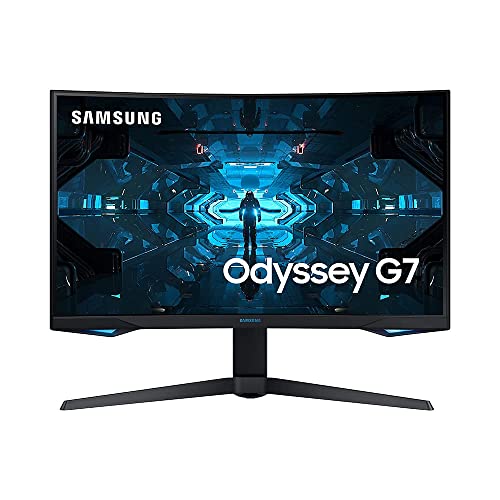
The Samsung Odyssey G7 in 32-inch form is designed for people who want a work screen that also excels at fast entertainment. Its large curved QHD panel wraps slightly around your field of view, which can feel immersive for games and video, and gives a wide canvas for spreadsheets, timelines, and side-by-side windows.
Performance is its defining strength. A very high refresh rate and fast response keep motion looking smooth, with adaptive sync support for both major graphics ecosystems. The stand provides height, tilt, swivel, and pivot so the large panel can be positioned carefully.
Specs
- Screen size: 32 inches, 1000R curved design
- Resolution: 2560 x 1440 QHD
- Panel type: VA QLED with wide color coverage
- Refresh rate: 240Hz, 1ms response time
- Ports: 1 x HDMI, 2 x DisplayPort, USB hub ports, headphone jack
- Stand adjustments: Height, tilt, swivel, and pivot, plus VESA mounting
- Additional features: HDR support, AMD FreeSync Premium Pro and G-Sync compatibility
Comparison Summary
All five monitors will improve on a basic laptop screen, but they lead in different areas. The Dell S2722QC is the well-rounded 4K USB-C choice for a tidy single-screen office. The LG UltraFine 27UP850K-W adds wider color and stronger USB-C charging for creators. The ASUS ProArt PA279CRV goes furthest on color accuracy, with the broadest coverage and calibration focus. The BenQ GW2790QT is the productivity specialist, trading 4K for comfortable QHD, a slightly smoother 75Hz refresh, and built-in microphone and eye-care features. The Samsung Odyssey G7 is the large, curved, high-refresh option for a combined work and gaming desk.
For ports, the USB-C models simplify laptop use, while the Samsung focuses on desktop and gaming connections.
Frequently Asked Questions
What size monitor is best for a home office?
For most desks, 27 inches is the sweet spot. It provides room for two windows side by side, keeps text large enough to read comfortably, and does not require a very deep desk. A 32-inch monitor can be excellent if you work with wide spreadsheets or timelines and have the depth for it. Always pair size with resolution, because a larger screen benefits from QHD or 4K to keep text sharp.
Is 4K worth it for work, or is QHD enough?
QHD is enough for many people and is often the most comfortable choice at 27 inches, with sharp text and no need for aggressive scaling. 4K becomes worthwhile when you edit photos or video, work with detailed data, or read very small text for hours. It also gives more effective workspace when scaling is set well. Confirm your computer supports the resolution you choose before buying.
Do I need USB-C on a monitor?
You do not need USB-C if you use a desktop with HDMI or DisplayPort. For a laptop-based desk, USB-C is one of the most useful features you can choose. A single cable can carry the picture while charging the laptop and connecting peripherals through the monitor hub, which reduces clutter and makes connecting faster. Check the power delivery wattage against your laptop needs, especially for larger laptops.
How should I set up a monitor for comfort?
Place the screen about an arm’s length away, with the top of the display at or slightly below eye level. Use height and tilt adjustment to avoid leaning forward. Keep the monitor centered on your main task, and angle a second screen inward if you use two. Reduce glare by positioning the display away from direct window light, take regular breaks, and increase text scaling rather than straining to read small letters.
Before you decide, check your laptop or desktop outputs, the length of cable you need to reach the desk position you want, and whether you plan to add a second screen later. A monitor that supports daisy-chaining or a strong USB hub can make that later upgrade much simpler. Also think about light in the room: a matte screen helps in bright spaces, and a stand with generous height range helps if you share the desk with another person or switch between sitting and standing during the day. These practical checks prevent the most common regrets after setup.
Conclusion
Choosing among the best computer monitors comes down to matching the panel to your work. If you want a dependable 4K screen with simple laptop docking, the Dell S2722QC covers the essentials well. If color for creative work matters, the LG UltraFine 27UP850K-W and the ASUS ProArt PA279CRV offer stronger color focus, with the ASUS leading on accuracy and coverage. If your priority is comfortable, meeting-ready productivity without 4K scaling, the BenQ GW2790QT is purpose-built for that role. If your desk is also your gaming station, the Samsung Odyssey G7 brings a large curved view and very fast motion handling.
Whichever model you choose, prioritize the stand, the ports your computer actually has, and a resolution that keeps text comfortable at your viewing distance. Those everyday details will affect your work more, over months and years, than any single headline feature.
More from Amazon
Programs that pair well with the guide above. Offers and eligibility are set by Amazon and may change.
Collect the home and kitchen items you want in one registry that guests can shop from.
Create a wedding registrySet up recurring deliveries of everyday items on eligible products. Terms and savings are set by Amazon.
Explore Subscribe & SaveFree shipping on eligible items, Prime Video and more. Eligible new members can start with a free trial.
Start a Prime free trialAudiobooks and podcasts to listen to on the go. Eligible new members can start with a free trial.
Try Audible freeAs an Amazon Associate we earn from qualifying purchases.







Write Your Review
No reviews yet. Be the first to share your experience!