

Key takeaways
- Compare the best home printers on print speed, ink or toner systems, wireless setup and paper handling for documents, photos and schoolwork at home.
As an Amazon Associate we earn from qualifying purchases.
Disclosure: This article contains affiliate links. If you buy through these links, we may earn a commission at no extra cost to you.
Our top pick: Brother HL-L2390DW. Runner-up: Brother DCP-L2550DW.
A home printer handles an odd mix of work. One morning it prints a boarding pass and a tax form, that evening a book report and a colour worksheet, and at the weekend a photo for a school project board. The best home printers cope without drama: quick first pages, wireless printing from phones and laptops, paper handling that needs little attention, and an ink or toner system whose running expenses stay predictable month after month.
This guide compares five proven machines: two monochrome laser all-in-ones for text-heavy households, one compact cartridge inkjet for mixed family use, one refillable tank model for low running expenses, and one five-ink model with stronger photo output and a document feeder.
How to Choose the Right Home Printer
Start with what you print most. If nearly everything is text — contracts, essays, invoices and forms — a monochrome laser is hard to beat. Lasers print fast, text is crisp on plain paper, and toner does not dry out during quiet weeks, which suits homes that print in bursts. If your household prints colour regularly, from charts and revision notes to craft projects, you need an inkjet, because the lasers here print in black only.
Next, consider the ink or toner system, because it decides your running expenses for years. Cartridges are simple, and high-yield versions stretch the interval between changes. Tank printers flip the equation: ink pours from bottles into large reservoirs, and one replacement set is rated for thousands of pages. Toner sits in between, with cartridges rated beyond a thousand pages and a separate long-life drum.
Paper handling matters too. A 250-sheet tray means refilling occasionally rather than weekly, and an automatic document feeder turns scanning a multi-page form into a one-step job. Automatic two-sided printing saves paper on long documents. Finally, check wireless setup: Wi-Fi, Wi-Fi Direct for guests, and AirPrint and Android support let everyone print from their own device.
Brother HL-L2390DW

The HL-L2390DW is the straightforward answer for homes that print documents and little else. This monochrome laser all-in-one prints, copies and scans from a flatbed, and it prints faster than anything else in this guide at up to 32 pages per minute. Text quality is what laser buyers expect: sharp, dark and consistent from the first page of a run to the last, suiting essays, contracts, shipping paperwork and study packs.
Paper handling is generous. The main tray holds 250 sheets, a single-sheet manual feed slot handles envelopes and card stock, and automatic two-sided printing is built in. The flatbed lid handles books and bound material, although the absence of a document feeder means multi-page scanning is a manual, page-at-a-time task.
Running expenses are predictable because Brother publishes clear toner yields: the standard TN730 cartridge is rated at roughly 1,200 pages, the high-yield TN760 at roughly 3,000 pages, and the DR730 drum at 12,000 pages. Wireless printing covers Wi-Fi, Wi-Fi Direct and AirPrint, with USB as a wired fallback. Choose this model when your printing is overwhelmingly black text and you value speed and simplicity over colour.
Specs
- Functions: Print, copy and scan via flatbed scanner
- Print speed: Up to 32 ppm monochrome
- Print resolution: Up to 2400 x 600 dpi
- Paper capacity: 250-sheet tray plus single-sheet manual feed slot
- Duplex printing: Automatic two-sided printing
- Toner: TN730 rated around 1,200 pages; TN760 high yield rated around 3,000 pages; DR730 drum rated 12,000 pages
- Connectivity: Wi-Fi, Wi-Fi Direct and USB 2.0, with AirPrint support
Brother DCP-L2550DW

The DCP-L2550DW takes the same laser formula and adds the feature busy households miss most: a 50-sheet automatic document feeder. Scanning a ten-page school consent packet, copying a worksheet bundle or archiving receipts becomes a load-and-walk-away job. Print speed climbs to up to 36 pages per minute, and the same 250-sheet tray and automatic two-sided printing carry over.
Like its sibling, this is a monochrome-only machine aimed at document households: homework, paperwork, invoices and reading packs. It uses the same TN730 and TN760 toner family and the same long-life DR730 drum, keeping running expenses easy to forecast. The flatbed scanner remains available for books and fragile originals.
Connectivity covers Wi-Fi, Wi-Fi Direct and USB, with AirPrint and mobile app printing. At 25.6 lb it is the heaviest pick here, so give it a permanent spot rather than moving it between rooms. Pick it if your household scans or copies multi-page documents every week and wants laser speed with that workflow covered.
Specs
- Functions: Print, copy and scan with flatbed and document feeder
- Print speed: Up to 36 ppm monochrome
- Print resolution: Up to 2400 x 600 dpi
- Automatic document feeder: 50-sheet capacity
- Paper capacity: 250-sheet main tray
- Duplex printing: Automatic two-sided printing
- Toner: TN730 rated around 1,200 pages; TN760 high yield rated around 3,000 pages; DR730 drum rated 12,000 pages
- Connectivity: Wi-Fi, Wi-Fi Direct and USB 2.0, with AirPrint support
Brother MFC-J1010DW

The MFC-J1010DW is the compact colour option for families who need a bit of everything. This inkjet all-in-one prints, scans, copies and faxes, and squeezes a 20-sheet automatic document feeder and automatic two-sided printing into a footprint small enough for a shelf or student desk. Speeds are rated at up to 17 pages per minute in black and 9.5 in colour, comfortable for homework and home-office documents without laser-level urgency.
Colour output is the reason to pick it over the lasers. Charts, presentations, worksheets and the occasional photo come out cleanly, with resolution up to 1200 x 6000 dpi on Windows systems. The 150-sheet tray suits light to moderate volume, and the 1.8-inch colour display makes copying and scanning from the machine itself straightforward.
It uses four individual LC401 cartridges, so you replace only the colour that runs out, and XL versions are rated at around 500 pages each. Wireless setup runs through the Brother Mobile Connect app, with Wi-Fi, Wi-Fi Direct and USB on board. Running expenses with standard cartridges are higher per page than the tank model below, so heavy colour printing points elsewhere, but for a typical family mix this is a balanced, space-friendly choice.
Specs
- Functions: Print, scan, copy and fax
- Print speed: Up to 17 ppm black and 9.5 ppm colour
- Print resolution: Up to 1200 x 6000 dpi (Windows); up to 1200 x 3600 dpi (Mac)
- Paper capacity: 150-sheet tray; 20-sheet automatic document feeder
- Duplex printing: Automatic two-sided printing
- Display: 1.8-inch colour LCD
- Ink: Four individual LC401 cartridges, with XL versions rated around 500 pages
- Connectivity: Wi-Fi, Wi-Fi Direct and USB 2.0, with mobile app printing
Epson EcoTank ET-2800
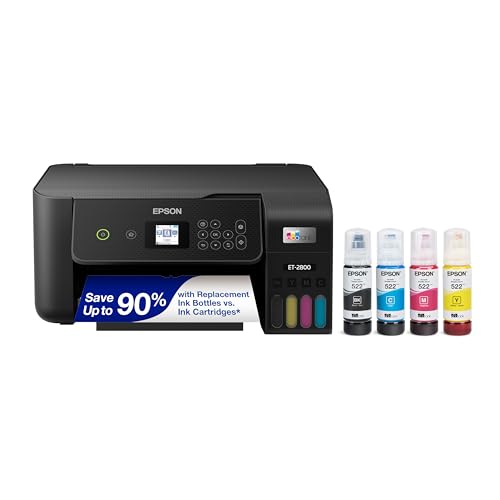
The EcoTank ET-2800, in the black finish tied to this listing, is built around one idea: stop buying cartridges. It has four refillable tanks topped up from Epson 522 ink bottles, rated at up to 4,500 pages in black and 7,500 pages in colour per replacement set. For households that print constantly — worksheets, craft templates, newsletters, revision notes — that yield transforms running expenses, because ink becomes an occasional refill instead of a recurring worry.
As a printer it is deliberately basic, and that is the trade to understand. Speeds are rated at up to 10 pages per minute in black and 5 in colour, two-sided printing is manual, and there is no document feeder, so scanning is flatbed only. The 100-sheet input keeps the body compact, and resolution up to 5760 x 1440 dpi means colour graphics and casual photos still look good for school projects.
Setup runs over Wi-Fi with the Epson Smart Panel app, with USB as a fallback. The ET-2800 suits patient households with high page counts: if your priority is printing lots of colour without watching an ink gauge, and you can live without a feeder or automatic duplex, it is the most economical engine here over the long term.
Specs
- Functions: Print, scan and copy via flatbed scanner
- Print speed: Up to 10 ppm black and 5 ppm colour
- Print resolution: Up to 5760 x 1440 dpi
- Ink system: Refillable EcoTank reservoirs using Epson 522 bottles
- Replacement ink yield: Up to 4,500 pages black and 7,500 pages colour per bottle set
- Paper capacity: 100-sheet input; maximum media size 8.5 x 14 inches
- Duplex printing: Manual two-sided printing
- Connectivity: Wi-Fi and USB, with Epson Smart Panel app support
Canon PIXMA TR8620a

The PIXMA TR8620a suits households that split printing between documents and photos. Its five individual ink tanks include a pigment black for crisp text alongside dye-based colours for richer photo output, and it prints borderless photos up to 8.5 x 11 inches, covering project boards and family prints without a trip to a print shop. Document speeds are rated at up to 15 pages per minute in black and 10 in colour, respectable for a photo-capable machine.
Office features are unusually complete for a home model: a 20-sheet automatic document feeder, automatic two-sided printing, fax, and two paper sources — a front cassette and a rear tray holding up to 200 sheets together — so plain and photo paper can both stay loaded. The 4.3-inch colour touchscreen is the largest, easiest control panel in this guide.
Connectivity covers Wi-Fi, Ethernet and USB, plus AirPrint and Android printing, so it can serve a wired desk and the whole household’s phones at once. It uses PGI-280 pigment black and CLI-281 colour cartridges, with XL and XXL versions for heavier use. Choose it when photo quality matters but you still need feeder scanning and duplex printing in the same machine.
Specs
- Functions: Print, scan, copy and fax
- Print speed: Up to 15 ppm black and 10 ppm colour
- Print resolution: Up to 4800 x 1200 dpi
- Ink: Five individual tanks — PGI-280 pigment black and CLI-281 dye colours, with XL and XXL options
- Paper handling: Front cassette plus rear tray, up to 200 sheets total; 20-sheet automatic document feeder
- Duplex printing: Automatic two-sided printing; borderless photos up to 8.5 x 11 inches
- Display: 4.3-inch colour touchscreen
- Connectivity: Wi-Fi, Ethernet and USB, with AirPrint and Android printing support
Comparison Summary
The five models divide cleanly by workload. For pure document speed the Brother lasers lead: the HL-L2390DW at up to 32 pages per minute for flatbed households, and the DCP-L2550DW at up to 36 pages per minute with a 50-sheet feeder for homes that scan stacks of paper. Both use the same toner family, hold 250 sheets, and print in black only.
Among the colour inkjets, the MFC-J1010DW is the compact all-rounder with feeder, fax and a 150-sheet tray. The EcoTank ET-2800 trades speed, feeder and automatic duplex for by far the highest ink yields, making it the long-term economy pick for high-volume colour households. The PIXMA TR8620a offers the strongest photo output, the biggest touchscreen and dual paper sources at middling speeds. The decision is colour versus mono, cartridges versus tanks, and whether a feeder earns its place in your routine.
Frequently Asked Questions
Should a home printer be laser or inkjet?
Choose laser if most of your printing is black text: lasers are faster, text is crisper, and toner tolerates idle weeks without drying. Choose inkjet if you print colour regularly or want photos, because every laser here is monochrome while all three inkjets handle colour documents and pictures.
Is a refillable tank printer worth it for a family?
For households printing hundreds of pages a month, usually yes. The EcoTank ET-2800 uses bottled ink rated at thousands of pages per set, so running expenses per page drop sharply versus cartridges. If you print only a few pages a week, a cartridge model may suit you better and offers faster speeds at this level.
Do I need an automatic document feeder at home?
It depends on your scanning habits. A feeder pays off if you regularly scan or copy multi-page forms, school packets or receipt stacks, as the DCP-L2550DW, MFC-J1010DW and PIXMA TR8620a allow. If you scan single pages, a flatbed-only model like the HL-L2390DW or ET-2800 is adequate.
Can everyone in the house print from their own phone or laptop?
Yes. All five models connect over Wi-Fi and support printing from phones, tablets, Windows and Mac computers, and most offer Wi-Fi Direct for a direct connection without a router. Set the printer up once, and each family member can send documents, photos and schoolwork from their own device.
Conclusion
There is no single best home printer, only the best match for your household’s mix of documents, photos and schoolwork. Pick the Brother HL-L2390DW for fast, simple black-and-white printing, or the DCP-L2550DW if a document feeder will save time every week. Choose the Brother MFC-J1010DW for compact colour versatility, the Epson EcoTank ET-2800 for the lowest running expenses on high colour volume, or the Canon PIXMA TR8620a when photos share the workload with everyday documents.
More from Amazon
Programs that pair well with the guide above. Offers and eligibility are set by Amazon and may change.
Collect the home and kitchen items you want in one registry that guests can shop from.
Create a wedding registrySet up recurring deliveries of everyday items on eligible products. Terms and savings are set by Amazon.
Explore Subscribe & SaveFree shipping on eligible items, Prime Video and more. Eligible new members can start with a free trial.
Start a Prime free trialAudiobooks and podcasts to listen to on the go. Eligible new members can start with a free trial.
Try Audible freeAs an Amazon Associate we earn from qualifying purchases.


Write Your Review
No reviews yet. Be the first to share your experience!