

Key takeaways
- Compare the best network switches on port count, gigabit speed, build quality and ease of setup to expand your wired home or office network today.
As an Amazon Associate we earn from qualifying purchases.
Disclosure: This article contains affiliate links. If you buy through these links, we may earn a commission at no extra cost to you.
Our top pick: NETGEAR GS308 8-Port Gigabit Ethernet Unmanaged Switch. Runner-up: TP-Link TL-SG108 8-Port Gigabit Unmanaged Switch.
A wired connection remains the most dependable way to connect a desk, a home office, and the equipment around a television. Wireless coverage shifts with walls and distance, while an Ethernet cable delivers the same gigabit link every time. The problem is simple arithmetic: a router often provides only three or four usable LAN ports, yet a desktop, a printer, a storage drive, a laptop dock, a console, and a streaming box can exhaust those ports in one room.
A network switch solves that shortage in minutes. Connect one switch port to one LAN port on your router, and the remaining ports become new wired connections. No account is required, and an unmanaged model needs no configuration. The five switches here are desktop gigabit models from established brands. Most share fanless metal designs, yet they differ in management, traffic handling, mounting, and size.
How to Choose a Network Switch
Port count and headroom
Count the devices you want to wire now, then remember the uplink. One port will be used by the cable from your router, so an eight-port switch leaves seven for equipment. Buy headroom: eight ports is the sensible default for a home office, because desks accumulate a dock, a printer, a storage drive, and a spare cable for a visiting laptop. Choosing eight now avoids stacking a second switch later.
Gigabit speed and switching capacity
Every pick here provides 10/100/1000 Mbps ports with auto-negotiation, so older 100 Mbps devices and modern gigabit devices can share the same switch. Check switching capacity too. An eight-port gigabit switch should offer 16 Gbps, allowing every port to communicate at full speed in both directions without the switch becoming a bottleneck. Auto-MDI/MDIX removes any need for crossover cables; any ordinary patch cable works in any port.
Unmanaged versus smart managed
An unmanaged switch is pure plug-and-play hardware: plug in power and cables, and it forwards traffic automatically. That simplicity suits most homes and small offices. A smart managed, or easy smart, switch adds a configuration interface with VLANs, quality of service, IGMP snooping, cable diagnostics, and link aggregation. Those tools help if you want to separate work devices from household devices, prioritize a voice handset, or test a faulty cable. If none of that sounds familiar, an unmanaged model will serve you just as well with less to maintain.
Build, noise, and placement
A metal housing handles heat and daily knocks better than a thin plastic shell. Every switch below runs without a fan, so there is no hum in a quiet office. Several sit on rubber feet or mount to a wall under a desk, keeping cables tidy, and front status lights confirm a link at a glance. Use Cat5e or Cat6 patch cables for gigabit links, and label both ends if you wire more than a few devices. Many models also save energy on idle links, and IEEE 802.3x flow control and jumbo frames help large transfers to a storage drive.
The Five Switches Compared in Detail
1. NETGEAR GS308 8-Port Gigabit Ethernet Unmanaged Switch

The NETGEAR GS308 is the straightforward answer for a desk that has run out of ports. This unmanaged eight-port gigabit switch uses a sturdy metal case designed for a desktop or a wall. Setup means connecting the power adapter, running one cable from your router to any port, and plugging in your equipment. Each port negotiates its speed automatically, and per-port lights show link and activity without opening any software.
In daily use, its 16 Gbps capacity means a large backup to a local drive does not have to slow a video call on another port. The fanless design stays silent beside a monitor, and there is no management interface to secure or update, which many buyers will count as a benefit. Choose the GS308 if you want a familiar brand and a switch you can install once and then forget.
Specs
- Ports: 8 x 10/100/1000 Mbps Gigabit Ethernet RJ45 ports with auto-negotiation and Auto-MDI/MDIX
- Switching capacity: 16 Gbps, non-blocking architecture
- Housing: Metal desktop enclosure, wall-mountable, fanless silent operation
- Forwarding: Store-and-forward with IEEE 802.3x flow control support
- Power: External power adapter, energy-efficient Ethernet design
- Indicators: Power and per-port link and activity LEDs
2. TP-Link TL-SG108 8-Port Gigabit Unmanaged Switch

The TP-Link TL-SG108 has been a default home network pick for years, for practical reasons. Its eight shielded gigabit ports sit in a compact steel case that rests on a desk or mounts on a wall, and it needs no configuration. For an unmanaged model it includes useful traffic features, including 802.1p and DSCP quality of service and IGMP snooping, which helps multicast streaming traffic reach only the devices that requested it instead of flooding every port.
That behavior suits a media corner as well as an office: a television, a streaming box, a console, and a storage drive can share the switch while traffic handling keeps streams orderly. The fanless metal build runs silently, and shielded ports are a thoughtful touch where cables and adapters sit close together. Pick the TL-SG108 if you want an unmanaged switch with a little more traffic intelligence, a proven record in home networks, and a steel case that disappears under a desk.
Specs
- Ports: 8 x 10/100/1000 Mbps RJ45 ports with auto-negotiation and Auto-MDI/MDIX
- Switching capacity: 16 Gbps with non-blocking forwarding
- Housing: Sturdy metal case with shielded ports, fanless design, desktop or wall mounting
- Traffic features: 802.1p/DSCP QoS and IGMP snooping support
- Standards: IEEE 802.3i, 802.3u, 802.3ab, 802.3x and 802.1p
- Extras: Green Ethernet energy-saving technology and per-port status LEDs
3. D-Link DGS-108 8-Port Gigabit Unmanaged Switch

The D-Link DGS-108 is one of the longest-running desktop switch designs in this roundup, and its appeal is durability and simplicity. Eight gigabit ports in a solid metal housing provide instant expansion for a home, a small office, or a creator workspace. It supports quality of service that prioritizes time-sensitive traffic such as voice and video, and it follows the IEEE 802.3az Energy Efficient Ethernet standard to reduce power draw during low activity.
In an office it quietly connects computers, a printer, and a storage drive; in a living room it gives a television, a console, and a streaming device stable wired links that do not compete with phones on wireless. The fanless layout has no moving part to wear out and makes no noise during calls or films. Support for jumbo frames also helps large local file transfers between capable devices. Choose the DGS-108 if you value a metal, no-fuss switch from a long-established brand, with energy saving and traffic prioritization handled automatically.
Specs
- Ports: 8 x 10/100/1000 Mbps Gigabit Ethernet ports with Auto-MDI/MDIX
- Switching capacity: 16 Gbps, store-and-forward architecture
- Housing: Metal desktop case, fanless silent operation, wall-mountable
- Traffic features: IEEE 802.1p QoS for voice and video prioritization
- Energy: IEEE 802.3az Energy Efficient Ethernet and D-Link Green technology
- Performance: Supports jumbo frames up to 9,600 bytes and 802.3x flow control
4. TRENDnet TEG-S80g 8-Port Mini Gigabit Switch

The TRENDnet TEG-S80g stands out for its unusually compact metal enclosure. It delivers eight gigabit ports and 16 Gbps of switching capacity in a mini housing that fits tight network corners, shallow shelves, and crowded entertainment cabinets where a wider switch would waste space. It remains a proper metal, fanless switch with diagnostic lights and GREENnet technology that reduces power use based on link status and cable length.
This model suits renters and anyone building a tidy, movable setup: place it behind a television or beside a router on a narrow shelf, and it will quietly connect a console, a streaming box, a small computer, and a storage drive. TRENDnet backs this line with lifetime manufacturer protection in the United States and Canada, and the model carries NDAA and TAA compliance. Pick the TEG-S80g if space is your tightest constraint.
Specs
- Ports: 8 x 10/100/1000 Mbps Auto-MDIX Gigabit Ethernet RJ45 ports
- Switching capacity: 16 Gbps in full-duplex mode
- Housing: Compact metal mini enclosure, fanless, desktop placement
- Buffer and table: 128 KB data buffering with a 4K MAC address table
- Energy: GREENnet technology reduces power use on idle links and short cables
- Frames: Jumbo frame support up to 9,216 bytes, IEEE 802.3x flow control
5. TP-Link TL-SG108E 8-Port Gigabit Easy Smart Switch
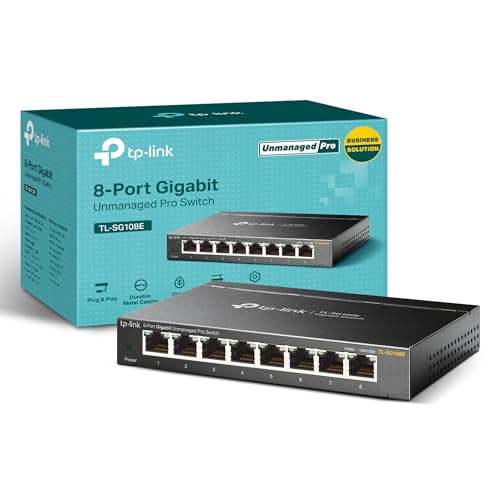
The TP-Link TL-SG108E looks much like its unmanaged sibling, but it adds a layer of control. This Easy Smart model provides a configuration interface with VLAN support, port-based and 802.1p and DSCP quality of service, IGMP snooping, link aggregation, port mirroring, and cable diagnostics. You can use it as a simple plug-and-play switch on day one, then open the interface later when a need appears, such as giving work devices their own VLAN or checking a mirrored port while troubleshooting.
That flexibility makes it the most future-ready pick here. A home office that adds a voice handset can prioritize that port; a household that later adds a lab computer can segment traffic without replacing hardware. The steel case, shielded ports, and fanless operation match the unmanaged TL-SG108, so the extra management brings no extra noise. Choose the TL-SG108E if you expect your network to grow in complexity.
Specs
- Ports: 8 x 10/100/1000 Mbps RJ45 ports with auto-negotiation and Auto-MDI/MDIX
- Management: Easy Smart interface with VLAN, port mirroring, and link aggregation (LAG)
- Traffic features: Port-based, 802.1p and DSCP QoS, plus IGMP snooping
- Switching capacity: 16 Gbps, fanless sturdy metal case with shielded ports
- Diagnostics: Cable testing and loop prevention tools in the management interface
- Mounting: Desktop or wall mount, plug-and-play operation when management is not needed
Comparison Summary
All five switches provide eight gigabit ports, 16 Gbps of switching capacity, fanless operation, and metal housings, so the decision comes down to management and emphasis rather than raw speed. The GS308 is the cleanest plug-and-play choice. The TL-SG108 adds QoS and IGMP snooping to an unmanaged design. The DGS-108 emphasizes energy-efficient operation and automatic prioritization. The TEG-S80g is the space saver, packing the same ports into the smallest enclosure here. The TL-SG108E is the step-up pick, adding VLANs, link aggregation, mirroring, and diagnostics. Any of the first four will disappear into daily life as a switch should; shortlist the TL-SG108E if you want configurable separation or prioritization.
Frequently Asked Questions
Does a network switch slow down my internet connection?
No. Each port negotiates up to 1,000 Mbps with its device, and the 16 Gbps capacity of these models exceeds what a home broadband line delivers. Devices on the same switch can also exchange local files at gigabit speed without that traffic leaving your home network.
How is a switch different from a router?
A router connects your home network to the internet, assigns local addresses, and usually provides wireless coverage and firewall functions. A switch does none of those jobs; it simply adds more wired ports inside the network your router already manages. The switch connects to one router LAN port, and every device plugged into it joins the same household network.
Can I connect a switch to another switch if I need more ports?
Yes. Running a cable between two switches expands the total number of wired connections, though each switch uses one port for that link. For a growing setup, moving to an eight-port model or placing one switch per room usually keeps cabling cleaner than long chains of small switches.
Do I need Cat6 cables, or will older cables work?
Cat5e supports gigabit speed over the distances found in most homes, so existing Cat5e runs are fine for every switch here. Cat6 is a good choice for new patch cables because it handles gigabit easily and gives headroom for faster equipment later. Older Cat5 cable may limit a link to 100 Mbps, which the port lights or device settings will usually reveal.
Conclusion
Adding a network switch is one of the simplest upgrades for a home or small office network. One cable from your router, one small fanless box, and a printer, a storage drive, a desktop, and a streaming device can all enjoy stable wired connections at once. Count your devices, leave a spare port or two, use decent Cat5e or Cat6 cables, and your pick should serve quietly for years.
More from Amazon
Programs that pair well with the guide above. Offers and eligibility are set by Amazon and may change.
Collect the home and kitchen items you want in one registry that guests can shop from.
Create a wedding registrySet up recurring deliveries of everyday items on eligible products. Terms and savings are set by Amazon.
Explore Subscribe & SaveFree shipping on eligible items, Prime Video and more. Eligible new members can start with a free trial.
Start a Prime free trialAudiobooks and podcasts to listen to on the go. Eligible new members can start with a free trial.
Try Audible freeAs an Amazon Associate we earn from qualifying purchases.



Write Your Review
No reviews yet. Be the first to share your experience!